
When reading a web application requirement, sometimes what we see on the surface looks very simple:
“The user can log in, view customer data, and update the transaction status.”
But behind that simple sentence, there are many technical decisions involved. There is communication between the browser and the server, API design, database structure, access control, and a mechanism to make sure the request really comes from a valid user.
This is why web and API foundations matter.
Not because we want to sound more technical, but because when we discuss requirements, design systems, or build features, we should not only see buttons and forms. We also need to understand how data moves, how the system protects access, and how the application can grow in a clean and maintainable way.
In this article, we will discuss several foundational concepts that often appear in modern web projects:
- Client-Server Architecture
- API Design
- REST APIs
- Databases
- SQL vs NoSQL
- Authentication vs Authorization
- Session-based vs Token-based Authentication
- JWT
I will explain them from the perspective of a System Analyst who often needs to connect business needs, system design, and technical implementation.
1. Client-Server Architecture: Understanding Who Requests What
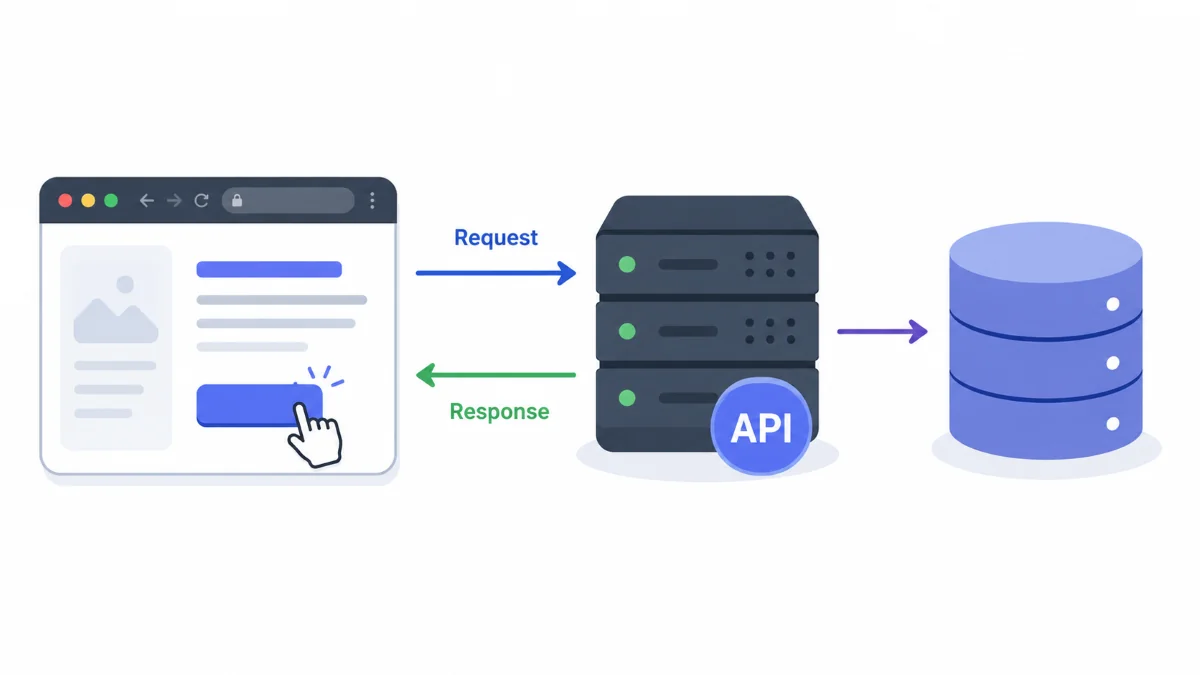
In a web application, there are usually two main sides: the client and the server.
The client is the part used by the user. Examples include a browser, a mobile app, or a web frontend built with React, Vue, Angular, or Next.js.
The server is the part that processes requests, runs business logic, reads or saves data, and sends responses back to the client.
A simple flow looks like this:
- The user opens the invoice list page.
- The browser sends a request to the server.
- The server retrieves invoice data from the database.
- The server sends the data back to the browser.
- The browser displays the data to the user.
From a System Analyst perspective, this concept is important because every requirement usually needs to be translated into questions such as:
- What data needs to be shown on the client?
- What action does the user perform?
- What business rule should the server process?
- What data needs to be stored or changed?
- What response should the user receive when the process succeeds or fails?
For example, consider this requirement:
“The user can approve a discount request.”
At the client level, there may be an Approve button. At the server level, there may be role validation, document status validation, approval hierarchy, audit log, and status changes. At the database level, there may be an update to approval data and an insert into a history table.
So, a small feature on the screen can represent a much longer process behind the scenes.
2. API Design: Not Just an Endpoint That Works
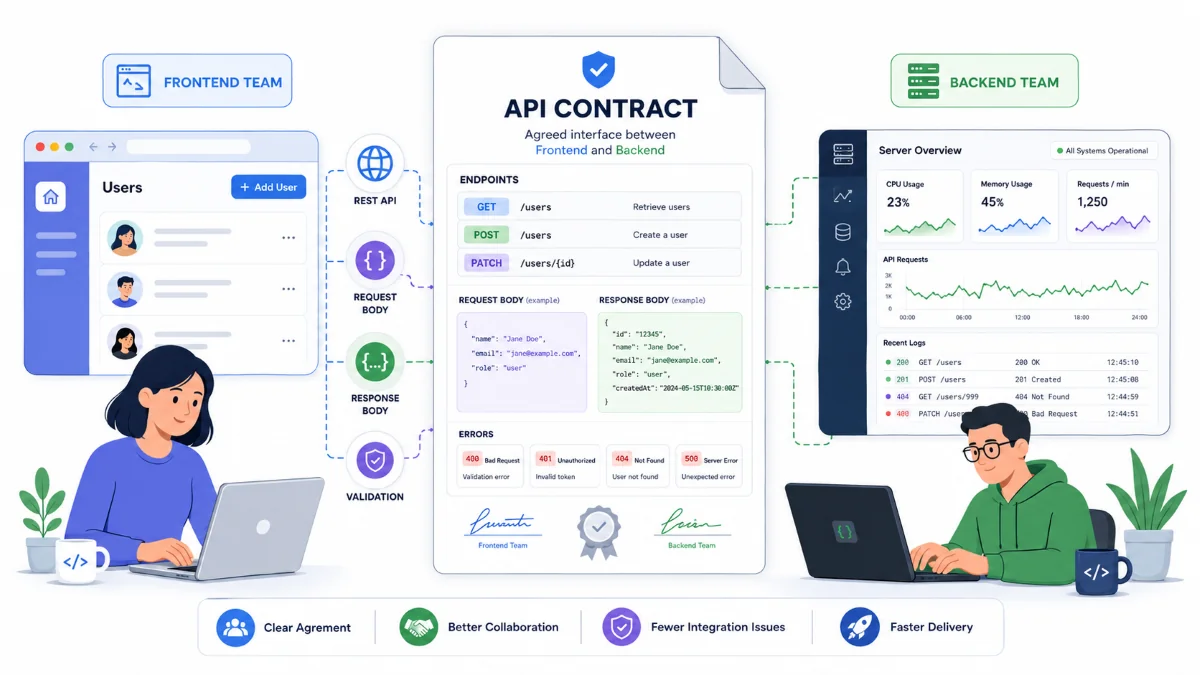
An API is a communication bridge between systems. In web applications, APIs often connect the frontend and the backend.
However, a good API is not only about whether it can be called successfully. A good API should be easy to understand, consistent, secure, and clear enough for other teams to use.
Example of an unclear endpoint:
POST /processData
This endpoint raises many questions:
- What data is being processed?
- Is this for creating, updating, approving, or deleting something?
- What does the response look like?
- What errors can happen?
A clearer example:
POST /api/invoices/{invoiceId}/approve
From the URL alone, we can guess that this endpoint is used to approve a specific invoice.
In API design, several things usually need attention:
- Endpoint names should be easy to understand.
- HTTP methods should match the purpose.
- Request body should be clear.
- Response should be consistent.
- Error messages should be helpful.
- Permission validation should exist.
- Documentation should be available.
From a System Analyst point of view, good API design helps turn requirements into something more concrete. For example, from this requirement:
“Admin can change a customer status to inactive.”
We can start shaping it into:
PATCH /api/customers/{customerId}/status
With a request body like:
{
  "status": "INACTIVE",
  "reason": "Customer requested account closure"
}
And a successful response like:
{
  "customerId": 1001,
  "status": "INACTIVE",
  "updatedAt": "2026-06-12T10:30:00"
}
From here, programmers, testers, and analysts can share the same understanding of how the feature should work.
3. REST APIs: A Common Pattern for Managing Resources
REST API is one of the most popular API design styles. Its main idea is to treat data as resources.
Examples of resources:
- Customer
- Invoice
- Payment
- Product
- Order
- User
REST APIs usually use HTTP methods such as:
GET     /api/customers
GET     /api/customers/{id}
POST    /api/customers
PUT     /api/customers/{id}
PATCH   /api/customers/{id}
DELETE  /api/customers/{id}
In general:
GETis used to retrieve data.POSTis used to create new data or execute a specific action.PUTis used to replace data completely.PATCHis used to update part of the data.DELETEis used to delete data.
However, in enterprise applications, not every action fits nicely into simple CRUD.
For example, invoice approval:
POST /api/invoices/{invoiceId}/approve
Technically, this may update the invoice status. But from a business perspective, this is not just a field update. There may be business rules, role validation, audit trails, and possible integration with other modules.
This is why REST API should still be understood together with business context. We should be careful not to force everything into simple CRUD endpoints when the actual business process is more complex.
4. Databases: Where Data Lives and Becomes the Source of Truth
A database is where an application stores data. In real projects, a database is not just a place to keep tables. It often becomes the main source of truth for business processes.
For example, in a billing system:
- Customer data is stored in the database.
- Invoice data is stored in the database.
- Payment data is stored in the database.
- Approval status is stored in the database.
- Audit logs are stored in the database.
From a System Analyst perspective, database design is closely related to business questions:
- What data needs to be stored?
- Is this master data or transaction data?
- Can this data be changed?
- Does the system need to keep the history of changes?
- Who is allowed to access the data?
- Will this data be used for reporting?
For example, consider this requirement:
“The user can view the history of invoice status changes.”
This means it is not enough to store only the latest status in the invoice table. We may need a history table, for example:
T_INVOICE_STATUS_HISTORY
It may contain:
- invoice_id
- previous_status
- new_status
- changed_by
- changed_at
- reason
Without proper database design, a feature that looks simple at first may become difficult to develop later.
5. SQL vs NoSQL: Choose Based on Need, Not Trend
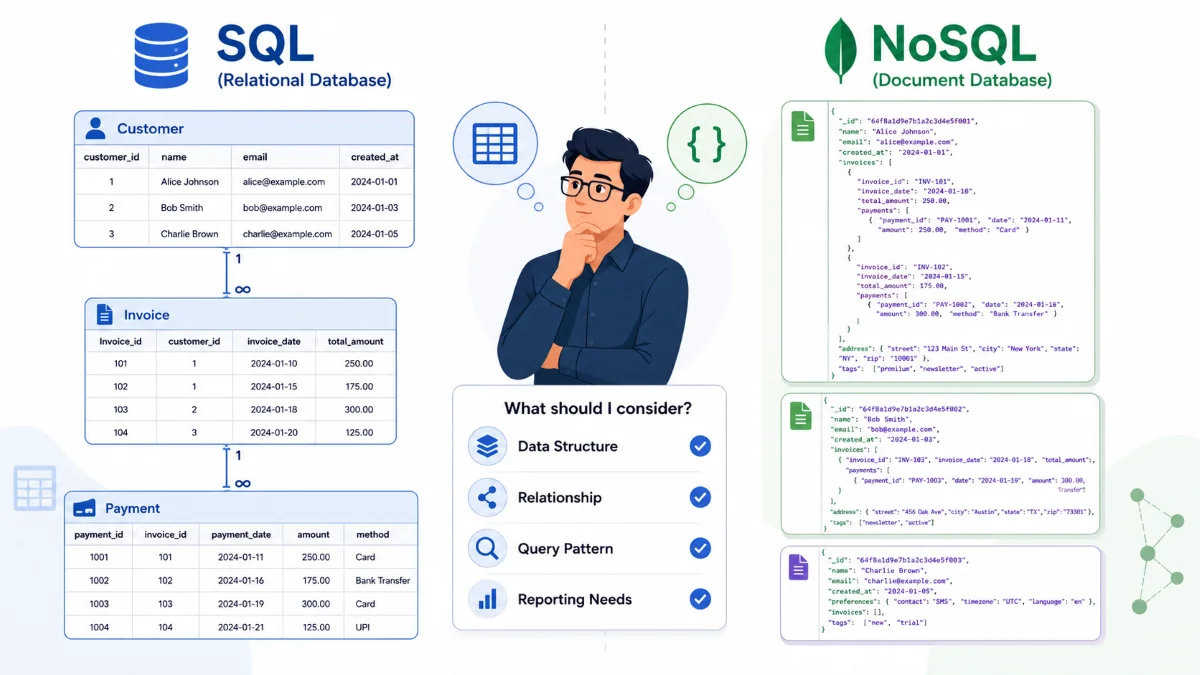
SQL and NoSQL are often compared as if one is always better than the other. In reality, both have their own suitable use cases.
SQL databases such as PostgreSQL, MySQL, Oracle, and SQL Server are suitable for structured data with clear relationships.
Examples:
- A customer has many invoices.
- An invoice has many invoice details.
- A payment refers to an invoice.
- A user has a role.
- A role has permissions.
SQL is useful when we need strong transactions, clear data relationships, and complex queries.
Example of relational data:
CUSTOMER
- customer_id
- customer_name

INVOICE
- invoice_id
- customer_id
- invoice_date
- total_amount
Meanwhile, NoSQL databases such as MongoDB, Redis, Cassandra, or DynamoDB are usually useful for more flexible data structures, certain large-scale use cases, or specific access patterns.
Examples of NoSQL usage:
- Storing activity logs.
- Storing semi-structured data.
- Storing cache.
- Storing events.
- Storing documents with frequently changing structures.
For example, user preferences may be more flexible when stored as a document:
{
  "userId": 1001,
  "preferences": {
    "theme": "dark",
    "language": "en",
    "notification": {
      "email": true,
      "sms": false
    }
  }
}
However, there is one important thing to remember. NoSQL does not mean “no design needed.” We still need to think about data structure, indexes, query patterns, consistency, and reporting needs.
From a System Analyst perspective, the better question is not simply “Should we use SQL or NoSQL?” but:
“What does the data look like, how often does it change, how strong are the relationships, and how will the data be read?”
6. Authentication vs Authorization: Login and Access Rights Are Different
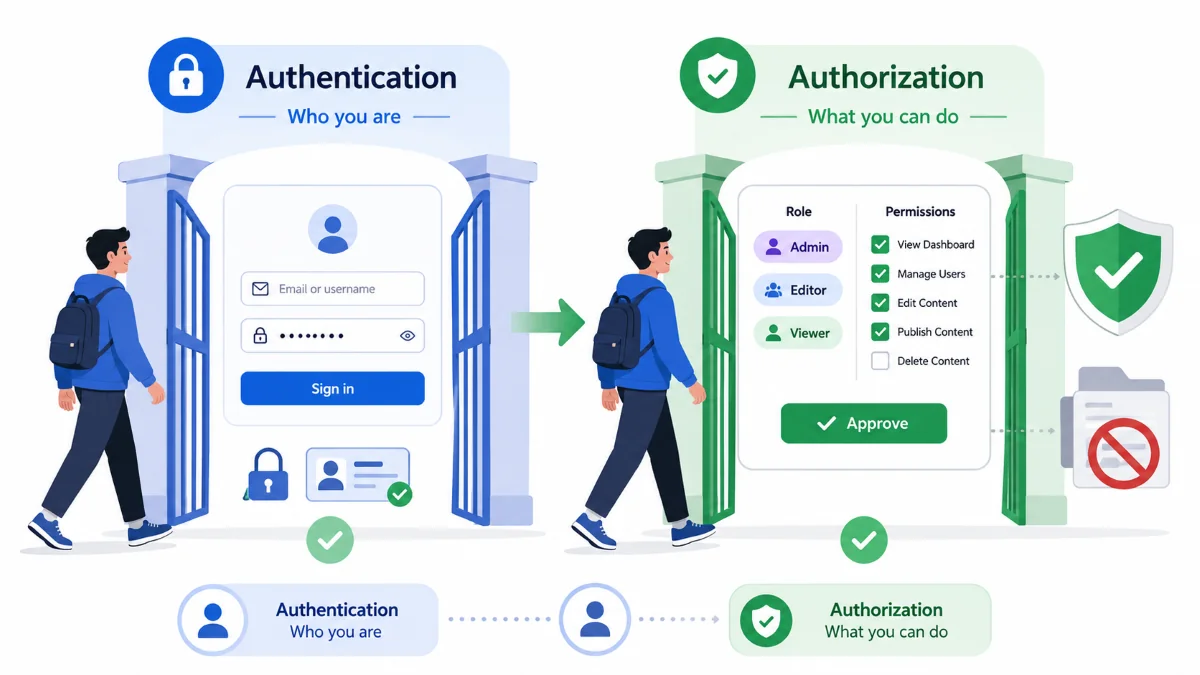
These two terms often appear together, but they mean different things.
Authentication is the process of proving who the user is.
Examples:
- The user enters an email and password.
- The system verifies the credentials.
- The system confirms that the user is valid.
In simple terms:
Authentication answers the question: “Who are you?”
Meanwhile, authorization is the process of determining what the user is allowed to do.
Examples:
- User A can view invoices.
- User B can create invoices.
- User C can approve invoices.
- User D can only view reports.
In simple terms:
Authorization answers the question: “What are you allowed to do?”
Consider this requirement:
“Only supervisors can approve transactions above $10,000.”
This requirement is not only about login. The user must be logged in first, but after that, the system also needs to check whether the user has the supervisor role and whether the transaction amount is above a certain limit.
In system design, authentication is usually discussed around login features. Authorization usually appears when discussing roles, permissions, workflows, approvals, and access control.
One important note: do not only hide buttons on the frontend.
For example, hiding the Approve button from regular users is good for user experience, but it is not enough for security. The backend must still validate authorization, because API requests can be sent directly without using the UI button.
7. Session-based vs Token-based Authentication
After a user successfully logs in, the system needs to “remember” that the user is authenticated. Two common approaches are session-based and token-based authentication.
Session-based Authentication
In session-based authentication, the server stores session data. After login succeeds, the server creates a session and sends a session ID to the client, usually through a cookie.
The flow roughly looks like this:
- The user logs in.
- The server validates the username and password.
- The server creates a session.
- The browser stores the session ID in a cookie.
- Each next request sends the cookie.
- The server checks the session in its storage.
This approach is commonly used in traditional web applications.
Its advantages:
- Suitable for server-rendered web applications.
- Sessions can be revoked from the server.
- Control stays on the server side.
Things to consider:
- The server needs to store sessions.
- If the system has multiple servers, sessions need to be managed properly.
- Protection against attacks such as CSRF is needed.
Token-based Authentication
In token-based authentication, the server gives a token after login succeeds. The client stores the token and sends it in the following requests.
Usually, the token is sent through a header:
Authorization: Bearer <token>
The flow roughly looks like this:
- The user logs in.
- The server validates the credentials.
- The server returns a token.
- The client stores the token.
- The client sends the token with every request.
- The server validates the token.
This approach is often used in modern applications, especially when the frontend is separated from the backend, or when the system supports mobile apps or microservices.
Its advantages:
- Suitable for APIs.
- Suitable for mobile applications.
- Easier to use across services when designed properly.
- The server does not always need to store session data.
Things to consider:
- Tokens must be stored securely.
- Token expiration should be configured.
- Refresh tokens need careful design.
- A leaked token can be abused while it is still valid.
There is no single approach that is always the best. The right choice depends on the application architecture, security requirements, client type, and how the system will grow.
8. JWT: A Token That Carries Information
JWT stands for JSON Web Token. JWT is often used in token-based authentication.
In simple terms, JWT is a token that contains information in a specific format and is digitally signed.
A JWT usually consists of three parts:
header.payload.signature
An example JWT payload may look like this:
{
  "sub": "1001",
  "name": "John Smith",
  "role": "ADMIN",
  "iat": 1718179200,
  "exp": 1718182800
}
Some common fields are:
sub: subject, usually the user ID.iat: issued at, the time when the token was created.exp: expiration time, the time when the token expires.role: user role, if the system chooses to store it in the token.
JWT helps the server verify requests without always looking up session data in the database. However, JWT should be used carefully.
A few important notes:
First, JWT is not a place to store secret data. The JWT payload can be read if someone gets access to the token. So, do not store passwords, credit card numbers, or sensitive information inside a JWT payload.
Second, JWT should have an expiration time. A token without expiration is risky if it gets leaked.
Third, changes in user access rights need to be considered. For example, if a user role is revoked, an old JWT may still contain the previous role until the token expires. This needs a proper strategy, such as short-lived access tokens, refresh tokens, or token blacklisting when needed.
Fourth, authorization validation must still happen on the backend. Do not assume that because a token contains a role, every action should automatically be allowed without checking the proper business rules.
9. Simple Example: Login and View Invoice List
To make the concepts easier to connect, let’s combine them into one simple example.
Requirement:
“The user can log in and view their invoice list.”
From this simple requirement, we can identify several parts of the system.
Client
The client provides a login page and an invoice list page.
The user enters an email and password, then clicks the login button.
API
The frontend sends a request:
POST /api/auth/login
With a body like:
{
  "email": "user@example.com",
  "password": "password"
}
If successful, the server returns a token:
{
  "accessToken": "eyJhbGciOiJIUzI1NiIsInR5cCI..."
}
Then, when the user opens the invoice list, the frontend sends a request:
GET /api/invoices
Authorization: Bearer eyJhbGciOiJIUzI1NiIsInR5cCI...
Server
The server performs several steps:
- Validates the token.
- Gets the user ID from the token.
- Checks whether the user is allowed to view invoices.
- Retrieves invoice data from the database.
- Sends the response back to the client.
Database
The database stores user, customer, invoice, and access relationship data.
For example:
USERS
CUSTOMERS
INVOICES
USER_CUSTOMER_ACCESS
If a user is only allowed to view their own invoices, the backend query must make sure that the returned data matches that user’s access rights.
So, the “view invoice” feature is not just about displaying a table. Behind it, there are authentication, authorization, API design, database queries, and security rules.
10. Common Mistakes When Understanding Web and API Foundations
These mistakes often happen when a team jumps into coding too quickly without aligning the design first.
Treating an API as Just a URL
An API is not just a URL. It is a contract between the client and the server. It includes request format, response format, validation, error handling, security, and business rules.
Confusing Authentication and Authorization
A user who successfully logs in is not automatically allowed to do everything. Login only proves identity. Access rights still need to be checked.
Storing Too Much Data in JWT
JWT should only store data that is truly needed. The more data we put inside the token, the higher the risk and the harder it becomes to manage changes.
Choosing a Database Because It Is Trending
A database should be chosen based on data needs, access patterns, transactions, reporting, and scalability. Not just because the technology is currently popular.
Securing Only the Frontend
Hiding buttons in the UI is useful, but it is not enough. The backend must remain the main gatekeeper for access validation and business rules.
11. How a System Analyst Reads Web and API Requirements
When receiving a requirement, a System Analyst can use the following simple questions.
For the client side:
- What page is needed?
- What action will the user perform?
- What data should be displayed?
- What feedback should appear when the process succeeds or fails?
For the API side:
- What endpoint is needed?
- What should the request body look like?
- What should the successful response look like?
- What error cases may happen?
- Is this API for create, read, update, delete, or a business action?
For the database side:
- What data needs to be stored?
- Is history needed?
- Is an audit log needed?
- Is the data relational?
- Will this data be used for reporting?
For the security side:
- Who can log in?
- Who can view the data?
- Who can change the data?
- Who can approve?
- Is access validation done on the backend?
With these questions, a requirement that initially looks general can become a clearer design that the development team can work on.
Closing
Web and API foundations are not only technical topics for backend developers. These concepts are also important for frontend developers, mobile developers, QA engineers, System Analysts, Product Owners, and anyone involved in software development.
By understanding client-server architecture, API design, REST API, databases, SQL vs NoSQL, authentication, authorization, session, token, and JWT, we can read requirements more carefully.
We do not only ask:
“Where should the button be?”
We also start asking:
“Where does the data flow, where should the rule run, who is allowed to access it, and how does the system keep it secure?”
In the end, a good application is not only an application that works on the screen. A good application also has clear data flow, clean APIs, reasonable database design, and security that is considered from the beginning.
Comments