
When a business says:
“The dashboard feels slow.”
or:
“The report takes too long to load.”
the problem is often discussed as if it were just a single issue. Someone says “add a cache”, someone else says “add more servers”, and another person says “rewrite the query”.
But performance and scaling are not single techniques. They are a set of decisions that interact with each other. Before we add anything, we need to understand what is actually slow and where the bottleneck is.
This article continues the foundation series. In the previous part, we discussed client-server, API design, databases, authentication, and JWT. In this part, we will discuss the next layer:
- Latency vs Throughput vs Bandwidth
- Caching
- Cache Invalidation
- Indexing
- Load Balancing
- Load Balancing Algorithms
- CDN
- DNS
The goal is not to make you an infrastructure expert. The goal is to help you read a performance requirement, identify which lever to pull, and communicate clearly with the team.
1. Why Systems Become Slow
Before we discuss techniques, let’s start with the question: why do systems become slow in the first place?
There are several common reasons:
- The database query scans too much data.
- The same data is recomputed on every request.
- A single server handles all traffic.
- Static assets travel from the origin server every time.
- DNS resolution takes too long.
- The network itself is slow between regions.
- The application does too much work synchronously.
A “slow” symptom can come from any of these places. That is why performance work always starts with measurement, not guessing.
From a System Analyst perspective, the first questions to ask are usually:
- Slow for whom? (one user, all users, certain regions)
- Slow at what time? (always, during peak, only first load)
- Slow at which step? (DNS, network, server, database, browser rendering)
Without these answers, optimization becomes trial and error.
2. Latency vs Throughput vs Bandwidth
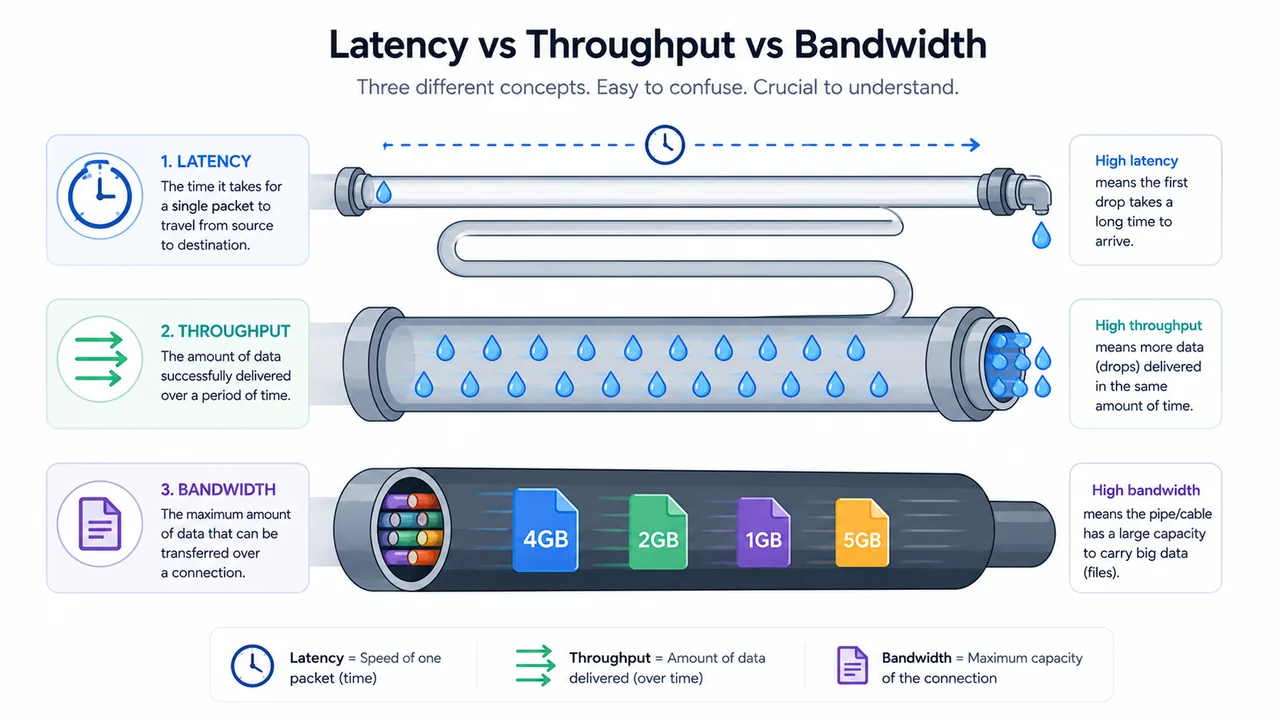
These three terms are often confused, but they mean different things.
Latency
Latency is the time it takes for a single operation to complete. It is usually measured in milliseconds.
Examples:
- 5 ms to respond from cache.
- 80 ms to query the database.
- 300 ms to render a page in the browser.
Latency is about “how long one thing takes”.
Throughput
Throughput is the amount of work the system can complete in a given time. It is usually measured in requests per second (RPS) or transactions per second (TPS).
Examples:
- The API can handle 500 RPS.
- The report job processes 10,000 records per minute.
Throughput is about “how many things we can do”.
Bandwidth
Bandwidth is how much data can be moved through a connection per second. It is usually measured in Mbps or Gbps.
Examples:
- 100 Mbps link between data centers.
- 1 Gbps network inside a region.
Bandwidth is about “how fat the pipe is”.
How They Relate
A common analogy is a water pipe:
- Bandwidth is the width of the pipe.
- Latency is how long it takes for water from one end to reach the other.
- Throughput is how much water comes out per second.
A wider pipe (more bandwidth) does not always help if the pipe is very long (high latency). A very short pipe (low latency) with a thin opening (low bandwidth) can still feel slow when sending large files.
In practice:
- Latency matters most for interactive user actions.
- Throughput matters most for batch processing or high-traffic APIs.
- Bandwidth matters most when moving large payloads (files, images, backups).
When to Optimize Which
| Goal | Usually optimize |
|---|---|
| Reduce page load time | Latency |
| Support more concurrent users | Throughput |
| Transfer large files faster | Bandwidth |
A useful trick: when discussing performance with non-technical stakeholders, ask which of the three they actually mean. Often they say “slow” but really mean “too many requests” or “too large response”.
3. Caching: Stop Doing the Same Work Again
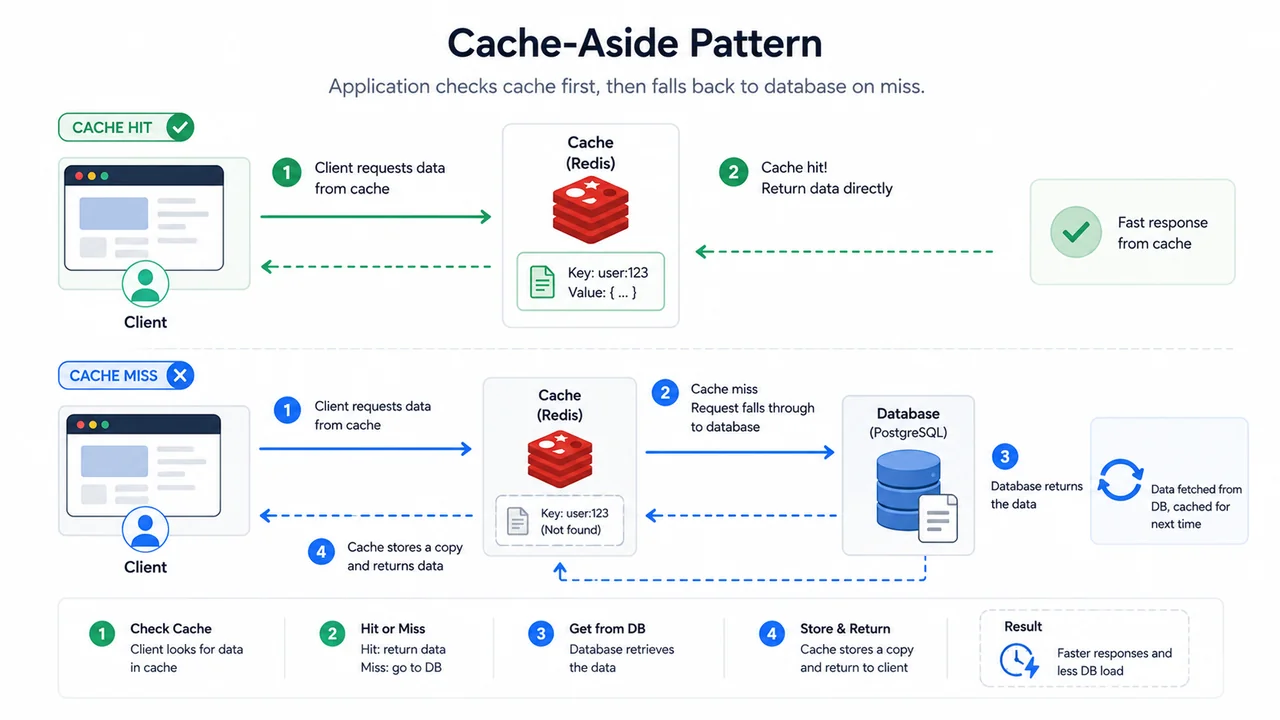
Caching is the act of storing the result of an expensive operation so the next request can read it faster.
A simple rule of thumb:
If something is read often and changes rarely, it is a good cache candidate.
Common Cache Layers
There are several layers where caching can happen:
- Browser cache: stores assets in the user’s browser.
- CDN cache: stores assets close to the user geographically.
- Application cache: stores results in memory (e.g. Redis, Memcached).
- Database cache: stores query results or pages internally.
- ORM / query cache: stores results of specific queries.
The closer the cache is to the user, the lower the latency. But the further the cache is from the source of truth, the harder it is to keep it consistent.
Basic Cache-Aside Pattern
A common pattern is cache-aside:
1. Read from cache.
2. If hit, return value.
3. If miss, read from database.
4. Store the result in cache.
5. Return value.
Pseudo-code:
def get_customer(customer_id):
    key = f"customer:{customer_id}"
    value = cache.get(key)

    if value is not None:
        return value

    value = database.query(
        "SELECT * FROM customers WHERE id = %s",
        customer_id
    )
    cache.set(key, value, ttl=300)
    return value
When Caching Helps
Caching is useful when:
- Data is read many times.
- Data changes slowly.
- The source is slow (database, external API, complex computation).
- A small delay between updates is acceptable.
When Caching Hurts
Caching is risky when:
- Data must always be fresh (e.g. stock count, balance).
- Cache key is wrong and causes collisions.
- Cache size is too small → high eviction rate.
- Invalidation strategy is unclear → users see stale data.
From a System Analyst perspective, the question is not “should we cache?”, but:
“How stale is acceptable, and who is affected when it is stale?”
4. Cache Invalidation: The Hard Part
There is a famous saying in software engineering:
“There are only two hard things in computer science: cache invalidation, naming things, and off-by-one errors.”
The joke aside, cache invalidation really is one of the hardest parts. The data in your cache must eventually match the data in the source of truth. The question is: when, and how?
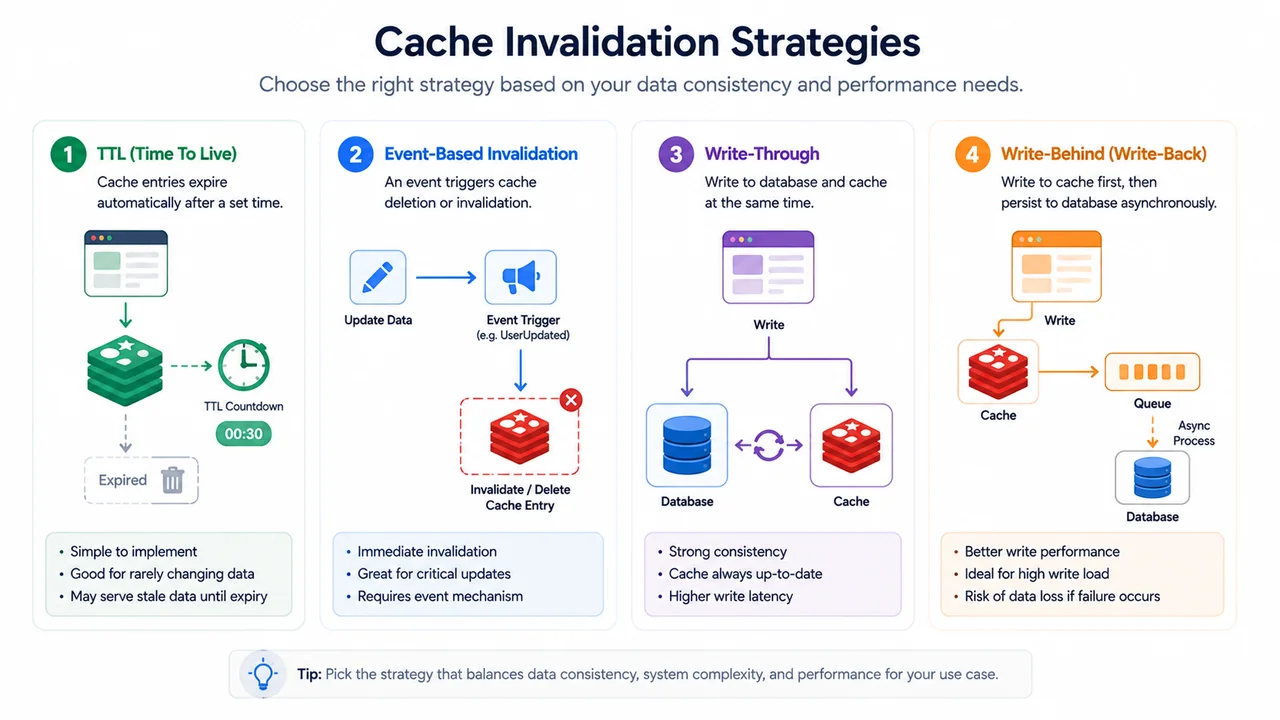
Strategies
TTL (Time To Live)
The simplest strategy. The cache entry expires after a fixed time.
cache.set("product:1001", product_data, ttl=60)
Pros:
- Simple.
- Predictable.
Cons:
- Users may see stale data until TTL expires.
- TTL too short → cache hit ratio drops.
- TTL too long → data stays stale too long.
Event-Driven Invalidation
When data changes, the system explicitly removes or updates the cache.
def update_product(product_id, data):
    database.update("products", product_id, data)
    cache.delete(f"product:{product_id}")
Pros:
- Cache stays fresh.
- No waiting for TTL.
Cons:
- More complex.
- Can miss events (failed jobs, lost messages).
Write-Through
Every write goes to the database and the cache at the same time.
def update_product(product_id, data):
    database.update("products", product_id, data)
    cache.set(f"product:{product_id}", data)
Pros:
- Cache stays in sync after writes.
Cons:
- Two systems to maintain in every write.
- If cache write fails, behavior is inconsistent.
Write-Behind
Writes go to cache first, then asynchronously to the database.
def update_product(product_id, data):
    cache.set(f"product:{product_id}", data)
    queue.enqueue("update_product", product_id, data)
Pros:
- Very fast writes.
Cons:
- Risk of data loss if cache fails before persisting.
- Hard to debug.
Common Risks
Cache Stampede
When a popular cache key expires, many requests hit the database at once. This can overload the database and make the system slower than without cache.
Mitigation:
- Lock around cache miss (only one process loads).
- Background refresh before expiry.
- Stagger TTLs for similar keys.
Thundering Herd
When many cache keys expire at the same time (e.g. after a deploy or a scheduled job), the database gets a sudden flood.
Mitigation:
- Add jitter to TTL values.
- Warm cache gradually.
Inconsistent Invalidation
Different services update the same data but only some of them invalidate the cache. Result: cache shows stale data.
Mitigation:
- Centralize update paths.
- Use change data capture (CDC) to detect changes.
A System Analyst should ask:
- How fresh does this data need to be?
- What happens if the user sees data that is 30 seconds old?
- Who is responsible for invalidating the cache?
5. Indexing: Making the Database Faster
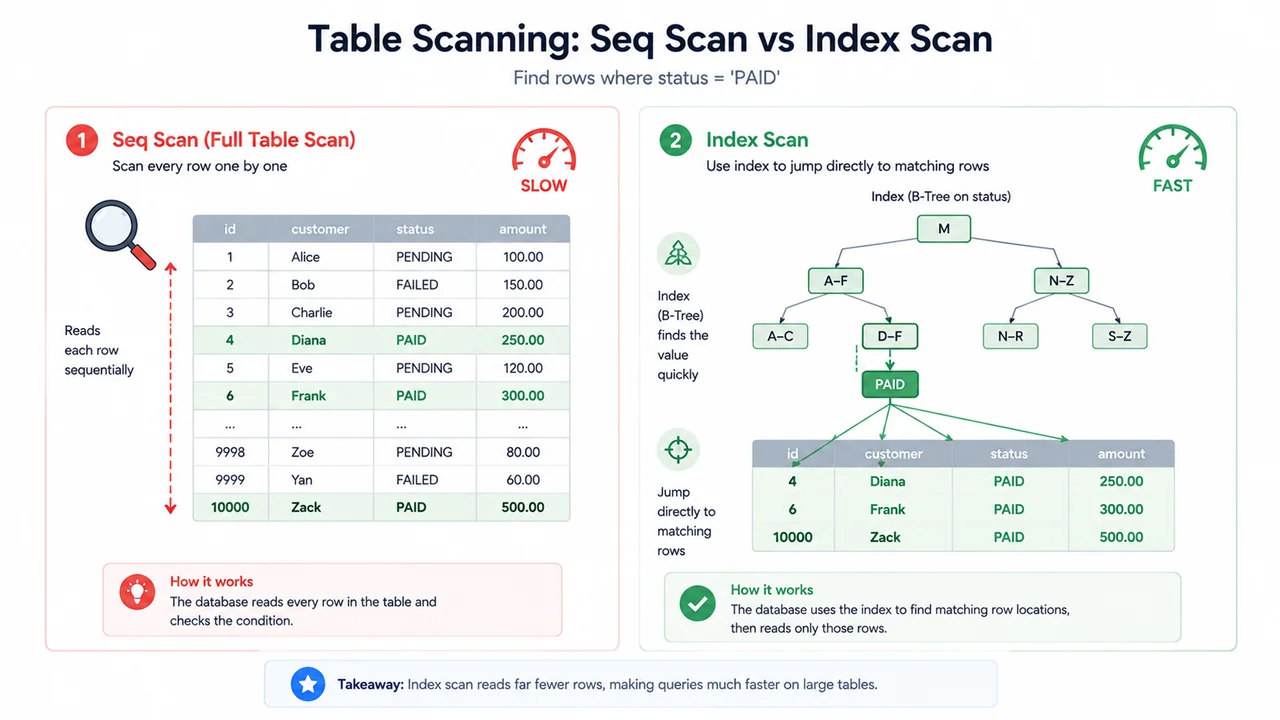
The database is often the place where systems become slow. One of the most common reasons: missing or wrong indexes.
What an Index Does
An index is a data structure that helps the database find rows faster, similar to an index in a book.
Without an index, the database has to scan every row in a table to find what you want. This is called a full table scan.
With an index, the database can jump directly to the matching rows.
Simple Example
Consider a table:
CREATE TABLE invoices (
    id BIGINT PRIMARY KEY,
    customer_id BIGINT,
    invoice_date DATE,
    total_amount DECIMAL(12, 2),
    status VARCHAR(20)
);
A frequent query:
SELECT *
FROM invoices
WHERE customer_id = 1001
  AND status = 'PAID';
Without an index on customer_id or status, the database scans every row. With many invoices, this becomes slow.
A useful index:
CREATE INDEX idx_invoices_customer_status
ON invoices (customer_id, status);
This index helps the database find invoices for a specific customer and status very quickly.
Composite Index and Column Order
Composite indexes depend on column order. The index above helps with:
WHERE customer_id = ?
WHERE customer_id = ? AND status = ?
It does NOT help efficiently with:
WHERE status = ? -- without customer_id
Because the index is sorted first by customer_id, then by status. The database cannot use it if you only filter by status.
Selectivity
A good rule: put high-selectivity columns first. A column is “high selectivity” if it filters out many rows.
For example:
customer_idusually has many distinct values.statususually has few (PAID, UNPAID, CANCELED).
So customer_id is more selective than status. Putting customer_id first is usually better.
How to Check
Most databases provide an EXPLAIN or EXPLAIN ANALYZE command:
EXPLAIN
SELECT *
FROM invoices
WHERE customer_id = 1001
  AND status = 'PAID';
Look for:
Seq Scan(full table scan) → usually bad for large tables.Index ScanorIndex Seek→ good.
When Indexing Hurts
Indexes are not free. They:
- Take extra storage.
- Slow down writes (INSERT, UPDATE, DELETE) because the index must also be updated.
- Can confuse the optimizer if too many exist.
Rule of thumb:
- Index columns used in WHERE, JOIN, ORDER BY.
- Avoid indexing columns that are rarely used in queries.
- Avoid indexing very small tables.
From a System Analyst perspective, the questions are:
- Which queries are slow?
- Are they filtering on indexed columns?
- How often are they called?
6. Load Balancing: Not Putting All Eggs in One Basket
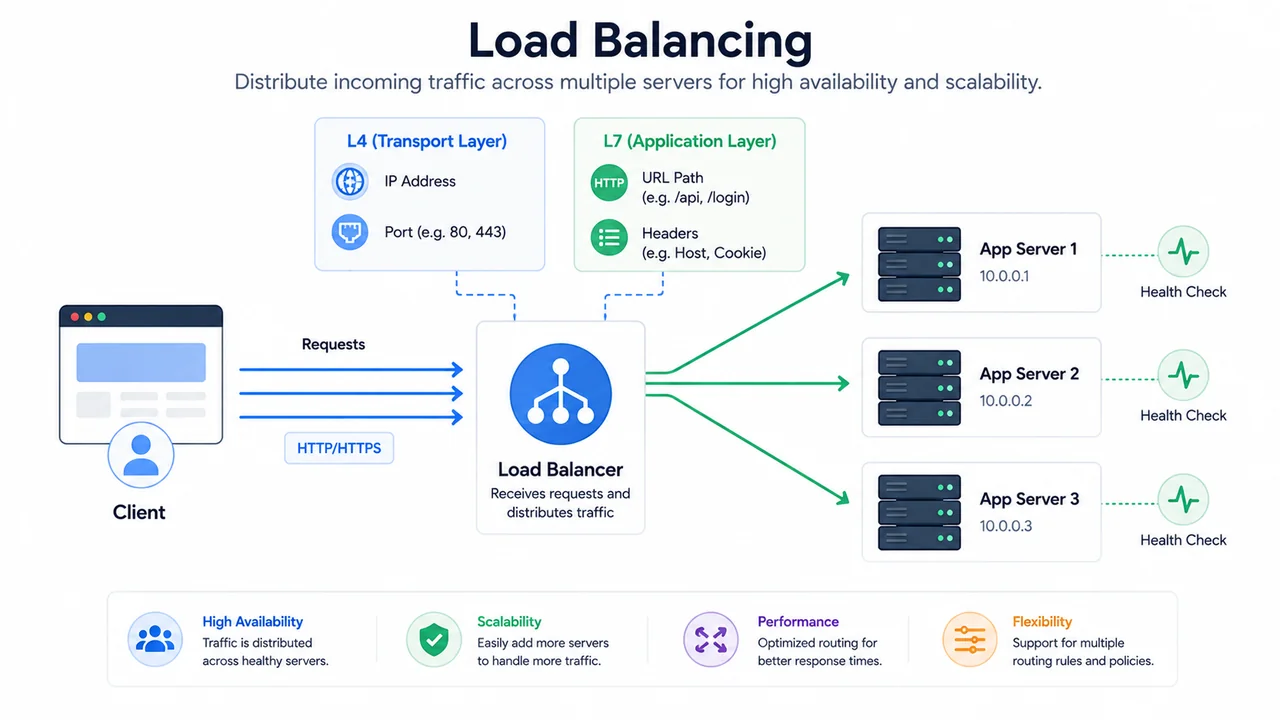
When traffic grows, one server cannot handle everything. Load balancing is the act of distributing requests across multiple servers.
Why Load Balancing
A single server has limits:
- CPU
- Memory
- Network bandwidth
- Database connections
If the application becomes popular, the single server becomes the bottleneck. Adding more servers is the natural next step. But then we need a way to split traffic between them. That is the job of a load balancer.
L4 vs L7 Load Balancing
L4 (Transport Layer) load balancer makes decisions based on IP, port, and protocol. It is fast and simple.
L7 (Application Layer) load balancer can read HTTP headers, URLs, cookies, and route based on content. It is more flexible but slightly more expensive.
Example routing rules:
/api/*→ API server pool./static/*→ static asset pool./admin/*→ admin server pool.
Health Checks
A load balancer should not send traffic to a broken server. Health checks periodically ping each server:
GET /health
If a server fails to respond correctly several times, the load balancer removes it from the pool.
Without health checks, users may get 500 errors even though there are healthy servers behind the load balancer.
Sticky Session vs Stateless
Some applications store session data on a specific server. In that case, the load balancer can use a “sticky session” (also called session affinity) to always send the same user to the same server.
But the more modern approach is to keep the application stateless:
- Session stored in a shared store (Redis, database).
- Any server can handle any request.
Stateless is easier to scale, easier to deploy, and safer when a server dies.
From a System Analyst perspective, when designing a new feature:
“Does this design depend on a specific server, or can any server handle the request?”
The answer should ideally be “any server”.
7. Load Balancing Algorithms
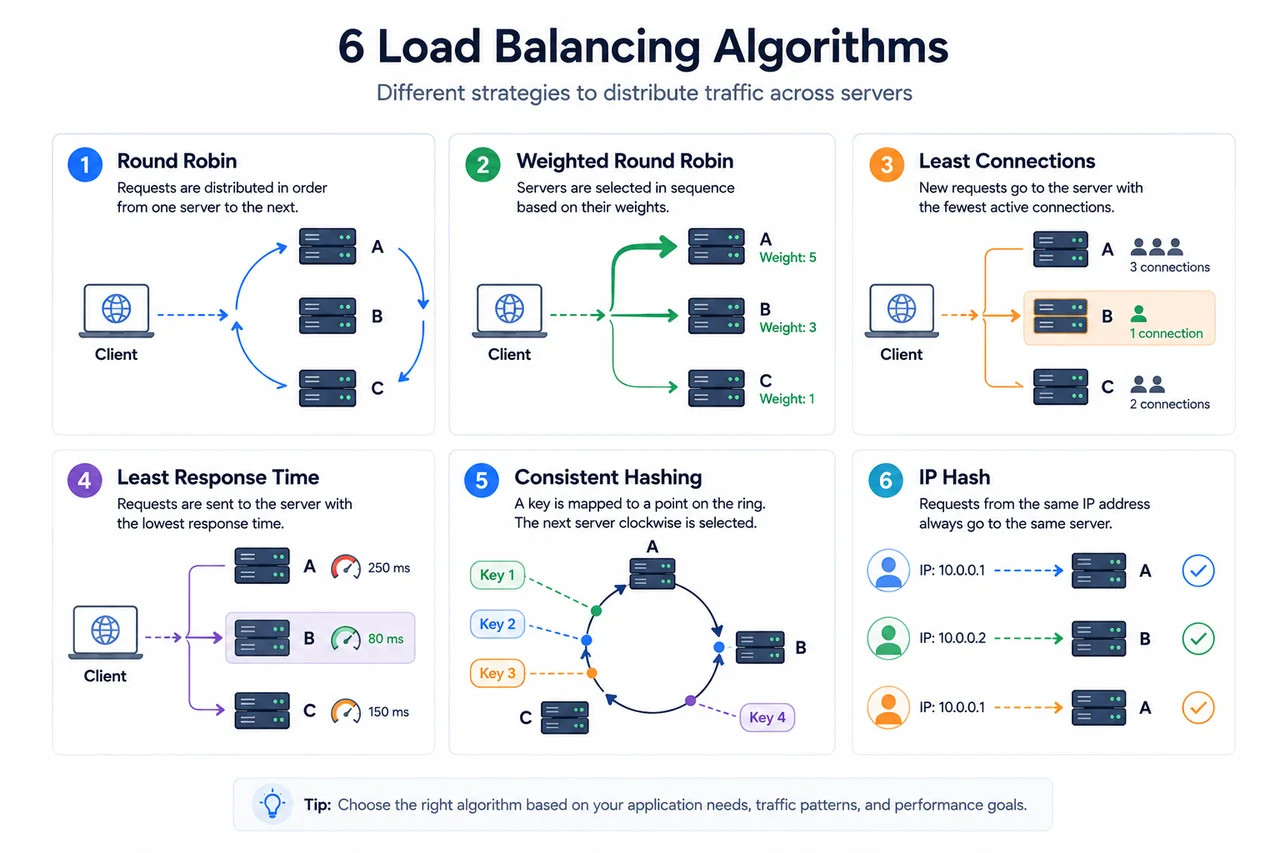
Not all load balancers split traffic the same way. Different algorithms are useful in different situations.
Round Robin
Send request 1 to server A, request 2 to server B, request 3 to server C, then repeat.
Pros:
- Simple.
- Even distribution when servers are similar.
Cons:
- Ignores server load.
Weighted Round Robin
Like round robin, but servers with higher weight get more requests. Useful when servers have different capacities.
Server A (weight 5)
Server B (weight 3)
Server C (weight 2)
Least Connections
Send the next request to the server with the fewest active connections.
Pros:
- Good when requests have different durations.
Cons:
- Does not account for actual CPU/memory load.
Least Response Time
Send the next request to the server with the lowest average response time.
Pros:
- Adapts to actual server responsiveness.
Cons:
- Needs measurement.
Consistent Hashing
Hash a key (e.g. user ID, session ID) and map it to a server. When a server is added or removed, only a small portion of keys need to be remapped.
Pros:
- Stable mapping.
- Good for caches and stateful workloads.
Cons:
- More complex.
IP Hash
Hash the client IP and always send the same client to the same server.
Pros:
- Simple sticky session.
Cons:
- Uneven distribution if clients come from few IPs.
When to Choose Which
| Situation | Suitable algorithm |
|---|---|
| Similar servers, similar requests | Round Robin |
| Servers have different sizes | Weighted Round Robin |
| Long-lived connections | Least Connections |
| Variable request speed | Least Response Time |
| Need stable mapping per key | Consistent Hashing |
| Simple sticky session | IP Hash |
A System Analyst does not need to memorize all of them. It is enough to know that “load balancing” is not a single thing and that the algorithm affects behavior.
8. CDN: Bringing Content Closer to the User
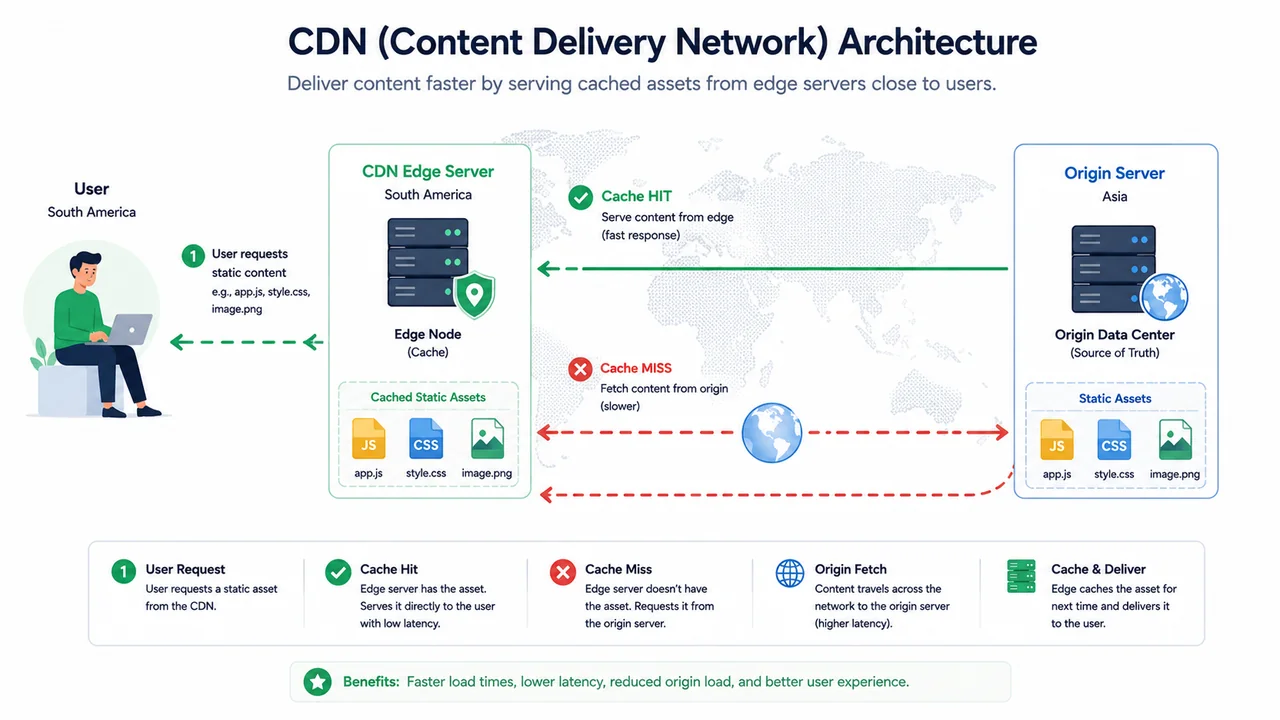
CDN stands for Content Delivery Network. It is a network of servers spread across many locations that cache and serve content close to the user.
How It Helps
Imagine your application is hosted in Singapore. A user opens the website from São Paulo. Without CDN:
User (São Paulo) → Internet → Server (Singapore)
The request travels a long distance, adding latency.
With CDN:
User (São Paulo) → Edge (São Paulo) → Server (Singapore) [only on cache miss]
The edge server already has the content, so the user gets it quickly.
What CDN Is Good For
CDN is great for:
- Static assets: JS, CSS, images, fonts.
- Public files: downloadable PDFs, videos.
- Cached HTML pages.
- API responses that are cacheable.
Cache Control Headers
CDN needs to know what to cache and for how long. This is controlled by HTTP headers:
Cache-Control: public, max-age=3600
Meaning: this response can be cached by any cache (browser, CDN) for 3600 seconds.
Common values:
public→ cacheable by any cache.private→ only the user’s browser can cache.no-store→ never cache.no-cache→ must revalidate before using cached copy.max-age=N→ cache for N seconds.
Dynamic Content Acceleration
Some CDNs also help with dynamic content:
- Optimized routing between user and origin.
- TCP optimization.
- TLS termination at the edge.
But for truly dynamic responses, the benefit is smaller than for static assets.
Trade-offs
CDN is great, but:
- Cache hit ratio matters. If most requests miss the CDN, benefit is small.
- Cache invalidation is hard. When you deploy a new version, the CDN may still serve the old one.
- Some content cannot be cached (personalized data, authenticated responses).
Origin Shield
A pattern where all CDN edges go through one “shield” cache before reaching the origin. This reduces load on the origin server and improves cache hit ratio.
From a System Analyst perspective:
- Public marketing pages? CDN is perfect.
- Personalized dashboard? Mostly not cacheable.
- Static assets? Always use CDN.
9. DNS: The Often Forgotten First Step
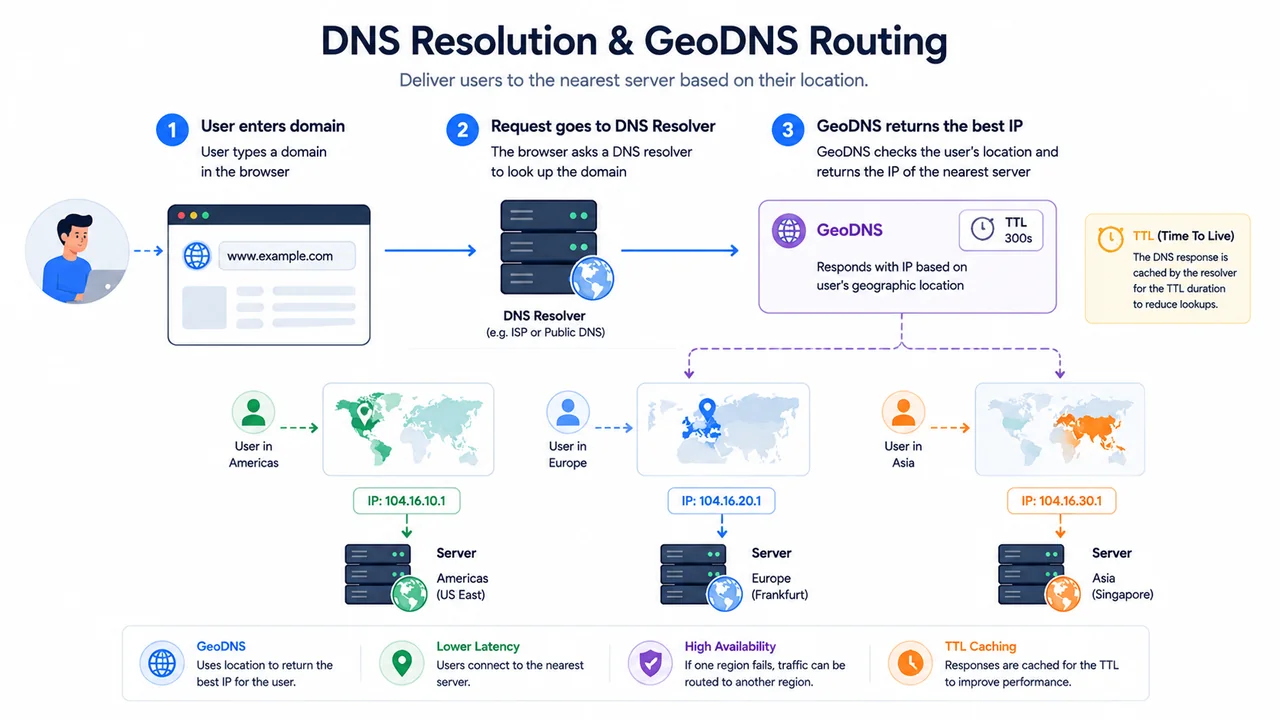
DNS (Domain Name System) is the system that translates a domain name like example.com into an IP address. Every request to your application starts with a DNS lookup.
Why DNS Matters for Performance
DNS affects performance in several ways:
- The first time a user visits your site, the browser must resolve the domain.
- If DNS is slow, every page load is slower.
- If DNS has a low TTL, DNS changes propagate faster but clients resolve more often.
- If DNS is geographically far, latency increases.
Common Performance Patterns
GeoDNS
Returns different IP addresses based on the user’s location.
User in Asia → Server in Asia
User in Europe → Server in Europe
This reduces the distance the request has to travel.
Anycast
Multiple servers around the world share the same IP address. The network routes the user to the nearest one.
CDNs and large DNS providers use this heavily.
TTL
TTL (Time To Live) controls how long a DNS record is cached by clients and resolvers.
example.com. 300 IN A 203.0.113.10
300 means: cache this for 300 seconds.
Trade-offs:
- Low TTL (e.g. 60s):
- Pros: changes propagate fast.
- Cons: more DNS lookups, slightly higher latency.
- High TTL (e.g. 86400s):
- Pros: fewer lookups, slightly faster.
- Cons: changes take long to propagate.
DNS as a Hidden Bottleneck
DNS issues are easy to miss because they happen before the application. Symptoms:
- Slow first load.
- Random users report slow access.
- Performance is uneven across regions.
Tools to check:
dig,nslookup,host.- DNS propagation checkers.
- Browser DevTools → Network → waiting time.
A System Analyst should remember:
The user’s experience starts with DNS, not with your application.
10. Simple Example: Putting It All Together
Let’s put all these concepts into one example.
Requirement:
“User opens the dashboard page.”
Step by step:
DNS
- The user types
app.example.comin the browser. - The browser resolves the domain via DNS.
- GeoDNS returns the IP of the nearest edge or region.
CDN
- The browser requests the HTML, JS, CSS, and images.
- Static assets are served from CDN edge (cache hit).
- HTML might be cached too, or it may be dynamic.
Load Balancer
- For dynamic HTML, the request hits a load balancer.
- The load balancer uses least-connections algorithm.
- A health check ensures the chosen server is healthy.
Application Server
- The server receives the request.
- It validates the session or token (auth).
- It checks cache for dashboard data (cache-aside).
- On miss, it queries the database.
Database
- The query uses indexes on
customer_idandreport_date. - The query plan shows index scan, not full table scan.
- The result is returned.
Back to the User
- The server returns the response.
- CDN may cache it for a short TTL.
- The browser renders the page.
Now imagine a problem at each step:
| Problem | Symptom |
|---|---|
| Slow DNS resolver | Slow first byte everywhere |
| CDN miss ratio too low | Origin server overloaded |
| Wrong load balancer algorithm | Some servers overloaded |
| Missing database index | Slow query, high DB CPU |
| Cache stampede after expiry | Sudden DB spike |
| Stale CDN content after deploy | Old JS/CSS still served |
The point is: performance is rarely fixed by a single change. It is usually a combination.
11. Common Mistakes
These mistakes appear often in real projects.
Optimizing Without Measuring
Adding caches, indexes, or servers before knowing what is actually slow.
Caching Everything
Caching data that changes often, without a clear invalidation strategy. Result: stale data, confused users.
Adding Indexes Everywhere
More indexes ≠ faster. Each index slows down writes. Index the queries that matter.
Assuming One Server Is Enough
Production should be designed for at least two servers from the start. Single server is a single point of failure.
Using CDN Without Cache Headers
Forgetting to set Cache-Control on responses. CDN cannot cache what is not marked as cacheable.
Wrong Load Balancing Algorithm
Using round robin when servers have very different loads. Result: some servers are overloaded while others are idle.
Ignoring DNS
Choosing a slow DNS provider or setting wrong TTL. Result: first-byte latency suffers.
No Health Checks
Load balancer sending traffic to broken servers.
Optimizing for Average, Not Tail
A p50 latency of 50 ms looks good, but a p99 of 5 seconds tells a different story. Always look at the tail.
12. How a System Analyst Reads Performance Requirements
When a requirement mentions performance, a System Analyst can use this checklist:
Latency and User Experience
- What is the acceptable response time for this screen?
- What is the budget for the first byte, the largest contentful paint, and time to interactive?
Throughput
- How many users do we expect?
- How many requests per second at peak?
- Are there burst patterns (e.g. end-of-month report)?
Data and Growth
- How big is the data now? In 1 year?
- How much of it is read vs written?
- Are there hot keys (some records accessed much more)?
Geography and Distribution
- Where are the users?
- Do we need multi-region?
- Is CDN enough, or do we also need replicated databases?
Caching Strategy
- Which data can be cached?
- How stale is acceptable?
- Who is responsible for invalidation?
Scalability
- Can the system scale horizontally?
- Are there shared resources that become bottlenecks?
- What happens when one server fails?
Observability
- Do we have metrics, logs, traces?
- Can we tell which layer is slow?
- Do we have alerts for tail latency?
These questions turn a vague “make it faster” request into a set of concrete design decisions.
13. Closing
Performance and scaling are not single techniques. They are a set of decisions that interact with each other:
- DNS decides how fast the journey starts.
- CDN decides how much content is delivered close to the user.
- Load balancing decides how traffic is spread across servers.
- Caching decides how much work is repeated.
- Indexing decides how fast the database responds.
When we discuss a performance requirement, we should not jump to a solution. We should ask:
“Which layer is slow, what is the actual constraint, and which lever is most appropriate to pull?”
Comments