
If you are looking for a complete guide to Azure Essentials certification questions and answers, this article deconstructs all 40 assessment questions from the Microsoft Azure Essentials Professional Certificate by Microsoft and LinkedIn. This assessment evaluates core competencies across the Microsoft Azure ecosystem, directly mirroring the foundational domains tested in the official Microsoft Certified: Azure Fundamentals (AZ-900) exam.
Many candidates approach foundational cloud certifications as simple vocabulary tests. However, analyzing the 40 assessment questions reveals that most questions are structured as practical architectural case studies: managing seasonal traffic spikes in retail, establishing isolated billing boundaries, enforcing enterprise governance across hundreds of subscriptions, and designing high-availability topologies to withstand datacenter outages.
This guide deconstructs all 40 assessment questions. Rather than presenting a flat, disconnected list, the questions are grouped into 7 enterprise cloud architecture pillars. Each question includes the official correct answer, underlying technical concepts, an analysis of common distractors, and practical architectural takeaways.
Quick Reference: Commonly Confused Azure Concepts
Before diving into individual questions, review this comparison matrix covering the concept pairs that most frequently confuse exam candidates:
| Dimension | Concept A | Concept B | Key Assessment Distiction |
|---|---|---|---|
| Scaling Dynamics | Scalability | Elasticity | Scalability refers to a system’s capacity to handle increased load (can be planned or manual); Elasticity specifically denotes dynamic, real-time autoscaling up and down without manual intervention. |
| Governance Containers | Resource Group | Subscription | A Subscription serves as a distinct billing boundary; a Resource Group acts as a lifecycle container for managing, deploying, and deleting related assets together. |
| Policy Scope | Resource Group Scope | Management Group Scope | Policy assigned at the Resource Group level applies only locally; policy assigned at the Management Group level automatically inherits down to all current and future subscriptions beneath it. |
| Fault Boundaries | Availability Sets | Availability Zones | Availability Sets protect against hardware rack and power failures (fault/update domains) within one datacenter; Availability Zones protect against total loss of an entire datacenter facility. |
| Access Control | Authentication (AuthN) | Authorization (AuthZ) | Authentication verifies who you are (identity proof); Authorization governs what actions you are permitted to execute. |
| Service Credentials | Connection Strings / Keys | Managed Identity | Connection strings store static secrets vulnerable to leaks; Managed Identity completely eliminates embedded credentials by leveraging automated Entra ID tokens. |
Pillar 1: Cloud Computing Foundations & Service Models
This domain evaluates core cloud characteristics, financial models (CapEx vs. OpEx), and cloud deployment models.
Question 6: Selecting an IaaS Service Model for Full OS Control
- Question: A company wants to migrate an existing on-premises application to the cloud. They want to keep full control over the operating system but avoid maintaining physical hardware. Which cloud service model best meets these requirements?
- Correct Answer: Infrastructure as a Service (IaaS)
- Key Concept: The customer maintains complete authority over the guest operating system, runtime configurations, and OS security patching, while the cloud provider manages physical hardware, power, cooling, and the hypervisor layer.
- Deep Dive: Under PaaS (Platform as a Service), the operating system is abstracted away, preventing custom kernel tweaks or OS-level configurations. IaaS (such as Azure Virtual Machines) is the standard landing zone for legacy lift-and-shift migrations requiring specific OS runtimes.
Question 7: System Resource Adjustment Based on Demand
- Question: Which cloud computing characteristic allows applications to automatically adjust resources based on demand?
- Correct Answer: scalability
- Key Concept: The foundational capability of cloud systems to adjust computing capacity (scaling up/down or scaling out/in) to accommodate changing volume requirements.
- Deep Dive: In foundational cloud terminology, scalability represents the broader system attribute of sizing capacity to match workload needs without architectural bottlenecks.
Question 25: Dynamic Real-Time Resource Adaptation
- Question: Which term describes the cloud computing characteristic that allows resources to automatically adjust based on demand?
- Correct Answer: elasticity
- Key Concept: The system’s ability to autonomously grow and shrink capacity in real time in response to immediate workload fluctuations.
- Deep Dive: While scalability focuses on capacity headroom, elasticity emphasizes rapid, bidirectional adaptability—provisioning resources during traffic spikes and immediately deprovisioning them when demand drops to prevent wasted spend.
Question 38: Modernizing Retail Infrastructure with Consumption-Based Pricing
- Question: A regional retail chain runs its own datacenter for point-of-sale, inventory, and reporting systems. The hardware is nearing end of life, and capacity planning has been difficult: some stores experience frequent seasonal spikes, while others remain underutilized most of the year. Leadership wants to avoid upfront costs, pay only for what they use, scale quickly, and modernize over time. Which approach best aligns with these goals?
- Correct Answer: Migrate workloads to a cloud provider using consumption-based pricing and autoscaling.
- Key Concept: Shifting from capital expenditures (CapEx) to operational expenditures (OpEx), paying purely for consumed resources (pay-as-you-go), and implementing autoscaling to absorb seasonal volatility.
- Deep Dive: On-premises datacenters require provisioning hardware for peak annual demand, leading to idle capacity for the remaining months. Consumption-based cloud pricing eliminates over-provisioning waste.
Question 40: Hybrid Cloud Architecture for Regulatory Data Sovereignty
- Question: A financial services company must keep some legacy systems on premises, deploy new customer apps quickly in the cloud, and keep certain data in country while securely connecting both environments. Which cloud deployment model best meets these needs?
- Correct Answer: hybrid cloud
- Key Concept: Combining on-premises infrastructure to satisfy local regulatory data sovereignty and legacy core systems with public cloud services to achieve rapid customer feature deployment.
- Deep Dive: Pure public cloud deployments may violate strict financial jurisdiction mandates, while private datacenters lack rapid modern scaling capabilities. A secure hybrid cloud connected via VPN or Azure ExpressRoute provides the optimal architectural compromise.
Pillar 2: Cloud Governance, Resource Hierarchy & FinOps
This domain focuses on billing boundaries, resource hierarchy, automated compliance via Azure Policy, and pre-deployment cost modeling.
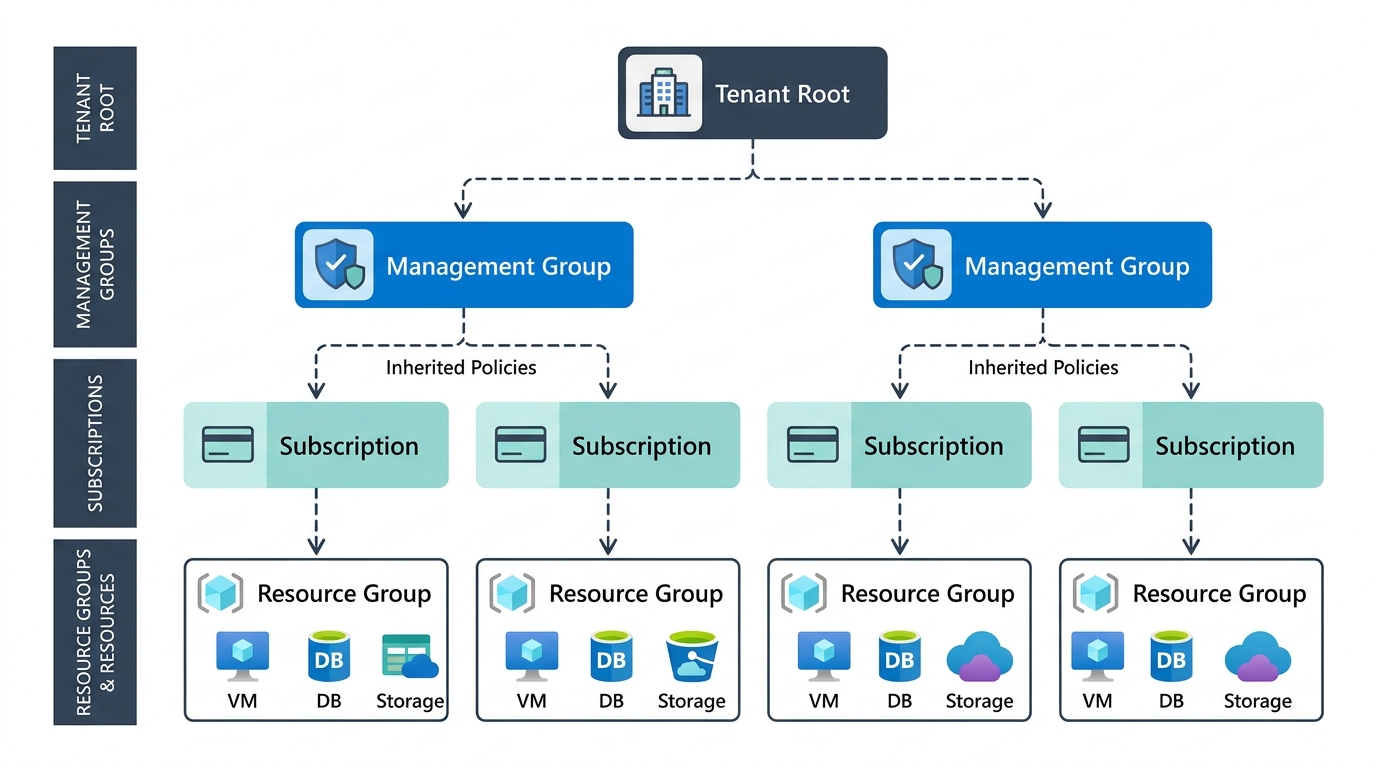 Azure governance hierarchy: compliance policies assigned at the Management Group level automatically inherit downward across all child subscriptions.
Question 1: Automated Configuration Auditing and Enforcement
- Question: Which Azure service helps enforce organizational standards by automatically auditing and evaluating resource configurations?
- Correct Answer: Azure Policy
- Key Concept: Automatically evaluating resource configurations against predefined organizational compliance standards and auditing or blocking non-compliant deployments.
- Deep Dive: Azure Policy acts as an architectural guardrail. It evaluates resource properties (such as enforcing TLS 1.2 or requiring encrypted disks) and can either log non-compliance (Audit) or reject non-compliant deployments altogether (Deny).
Question 2: Isolated Billing and Clean Lifecycle Management
- Question: A company is preparing to deploy several Azure services for a new internal reporting solution. The team wants to keep all billing for this solution separate from other projects, organize related resources together, be able to delete the entire solution quickly when the project ends, and maintain flexibility in how resources are organized within the environment. Which combination of Azure constructs should the team use?
- Correct Answer: Create a single subscription for the project and place all related resources inside one resource group.
- Key Concept: A Subscription acts as an isolated billing boundary, while a Resource Group functions as a unified lifecycle container.
- Deep Dive: Placing the workload into its own subscription prevents invoice mixing across teams. Encapsulating all underlying resources into a single Resource Group allows the entire solution to be decommissioned cleanly in a single action (
az group delete).
Question 4: Enterprise Cost Control via SKU Restrictions
- Question: A company wants to control Azure costs across all its subscriptions. They need to stop teams from using non-approved, expensive SKUs and make sure the same cost rules apply everywhere. Which Azure option best supports this?
- Correct Answer: Assign Azure Policy initiatives at the management group level.
- Key Concept: Defining a policy initiative (policy set) at the Management Group level guarantees that SKU restrictions automatically inherit across every subscription under that hierarchy.
- Deep Dive: Configuring policies on individual subscriptions leaves governance gaps whenever new subscriptions are provisioned. Assignment at the Management Group scope ensures centralized, foolproof enforcement.
Question 5: Spending Limits and Threshold Alerts
- Question: Which Azure tool helps you set spending limits and receive alerts when your cloud costs approach a threshold?
- Correct Answer: Azure Cost Management budgets
- Key Concept: Setting financial budgets and triggering automated notifications (email/webhooks) when actual or forecasted spend reaches defined percentage thresholds (e.g., 80%, 90%, 100%).
- Deep Dive: Azure Cost Management budgets do not shut down production workloads by default (to avoid unintentional service outages), but rather act as an early-warning telemetry system for engineering and finance teams.
Question 10: Enforcing Mandatory Tags on Resource Groups
- Question: Your organization wants to ensure that every new resource group created in Azure automatically includes a specific set of required tags (such as Department and Environment). If a user creates a resource group without these tags, Azure should block the deployment. Which Azure feature should you use?
- Correct Answer: Azure Policy
- Key Concept: Inspecting deployment payloads with a
Denyeffect to block the creation of Resource Groups lacking mandatory metadata tags. - Deep Dive: Azure RBAC controls who can create resources, but RBAC does not inspect the contents or metadata of the payload. Only Azure Policy inspects configuration payloads and blocks non-compliant requests.
Questions 12 & 22: Primary Purpose of Azure Resource Groups
- Question 12: The main purpose of a resource group in Azure is to _____.
- Correct Answer: group related resources so they can be managed together
- Question 22: What is the primary purpose of an Azure resource group?
- Correct Answer: to organize and manage related Azure resources
- Key Concept: Providing a logical boundary for resources that share the same lifecycle, simplifying operational monitoring, role-based access assignment, and cleanup.
Question 13: Enforcing Cost Centers and SKU Controls for Future Subscriptions
- Question: Your company uses many Azure subscriptions. Leadership wants to enforce cost center tags, block unapproved SKUs, and ensure these rules apply to all existing and future subscriptions automatically. Which Azure feature best meets these requirements?
- Correct Answer: Azure Policy assigned at the management group level
- Key Concept: Azure’s hierarchical inheritance guarantees that any new subscription created under an existing Management Group immediately inherits all active governance policies.
Question 14: Pre-Deployment Cost Estimation and Architectural Modeling
- Question: A team is preparing to deploy a new workload and wants to estimate the future monthly cost before deploying anything. They need to model different VM sizes and storage options to understand how each configuration affects pricing. Which Azure tool should they use?
- Correct Answer: Azure Pricing Calculator
- Key Concept: A web-based modeling tool used during architectural design to simulate monthly operational costs across VM SKUs, storage tiers, and deployment regions prior to provisioning.
- Deep Dive: Azure Cost Management evaluates historical, post-deployment billing data, whereas the Azure Pricing Calculator is purely a pre-deployment planning tool.
Question 18: Unified Management, Deployment, and Teardown
- Question: What should you use to group related Azure resources so they can be managed, deployed, and deleted together?
- Correct Answer: resource groups
- Key Concept: Resource Groups serve as the fundamental unit of deployment and lifecycle management in Azure Resource Manager (ARM).
Question 19: Centralized Regional Governance and Compliance Reporting
- Question: A company is setting up a new Azure subscription for a partner team. Which solution meets all of these requirements? (Applies central governance rules automatically, Prevents production resources from being deployed in nonapproved regions, Blocks any noncompliant deployments, Shows compliance results in one place)
- Correct Answer: Azure Policy
- Key Concept: Using the built-in Allowed Locations policy definition to prevent deployments outside compliant jurisdictions while surfacing organizational compliance status in a centralized dashboard.
Pillar 3: Security, Identity & the Shared Responsibility Model
This domain covers identity verification, role-based access control (RBAC), credential elimination, and the customer’s immutable responsibilities in the cloud.
Question 11: Authentication vs. Authorization Fundamentals
- Question: Which statement best describes authentication in Azure?
- Correct Answer: Authentication verifies the identity of a user before granting access.
- Key Concept: Authentication (AuthN) verifies identity credentials (passwords, certificates, MFA tokens). Authorization (AuthZ) determines which specific permissions the authenticated identity holds.
- Deep Dive: A common exam trap confuses proving identity with granting permissions. Proving who is knocking at the door is authentication; deciding whether they are allowed into the vault is authorization.
Question 15: Customer OS Maintenance Responsibilities in IaaS
- Question: Which responsibility still belongs to the customer when using Azure VMs?
- Correct Answer: updating and patching the operating system on the VM
- Key Concept: In IaaS, the cloud provider’s maintenance responsibility stops at the physical hardware and hypervisor. The customer is entirely responsible for the guest OS, security patches, middleware, and applications.
- Deep Dive: Microsoft ensures the physical host server and datacenter are secure, but if a Windows or Linux VM is compromised due to unpatched guest OS vulnerabilities, that is purely a customer-side failure.
Question 23: Customer Responsibilities in PaaS Environments
- Question: A company is moving its customer web app to the cloud using PaaS for both the app and its database. The cloud provider will handle the infrastructure and operating system. Under the shared responsibility model, what does the customer still need to manage?
- Correct Answer: securing the app’s data and controlling who can access it
- Key Concept: Under PaaS, the cloud provider manages the OS and runtime environment, but application data security and identity/access governance remain customer responsibilities across every model (IaaS, PaaS, and SaaS).
- Deep Dive: The cloud provider cannot determine which internal users should access sensitive records. Identity governance and data classification always belong to the customer.
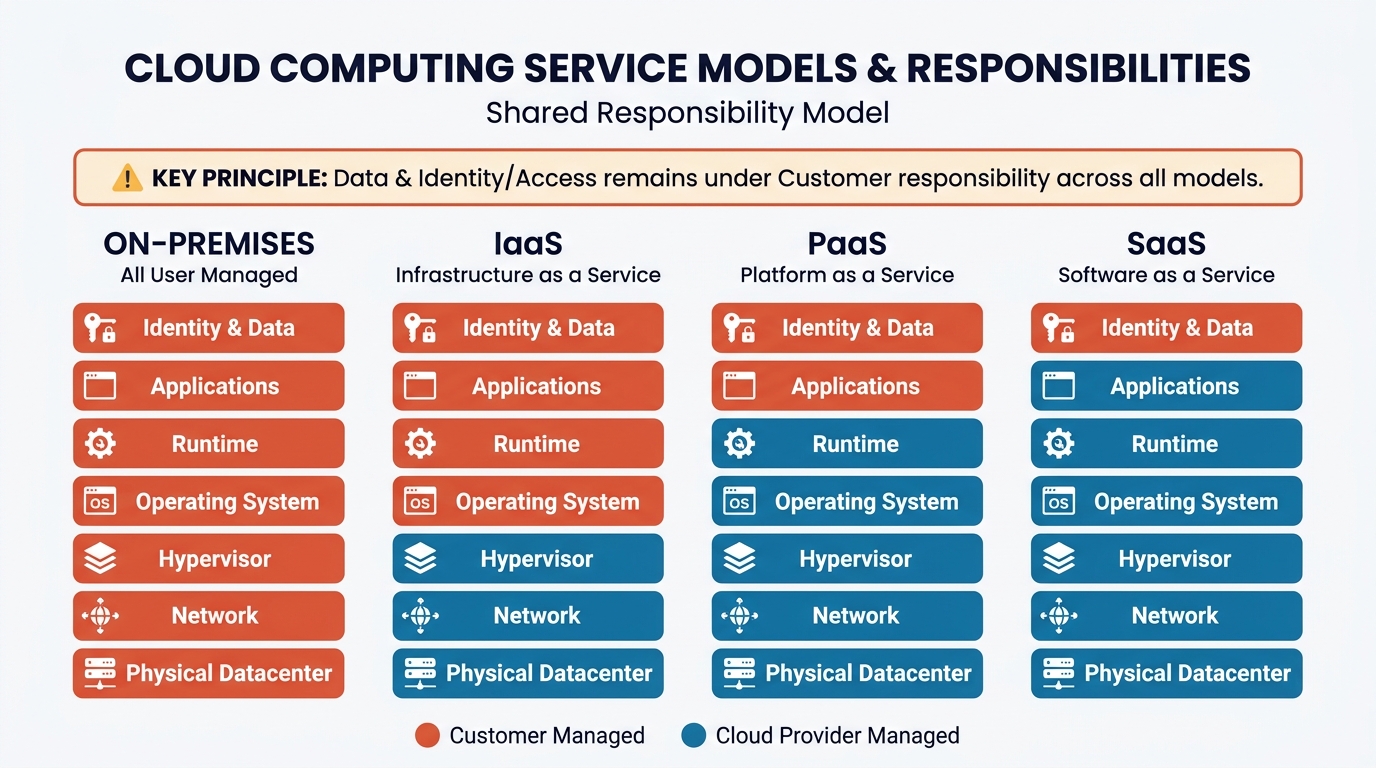 Shared responsibility model: securing application data and managing identity/access remains the customer’s sole responsibility across all cloud models.
Question 24: Least Privilege RBAC Assignment at Resource Group Scope
- Question: A development team needs Contributor access to all resources for a specific application that lives in a single resource group. They should not have access to resources in other resource groups or subscriptions. How should you assign their permissions?
- Correct Answer: Assign the Contributor role to the team’s security group at the resource group scope.
- Key Concept: Applying the principle of least privilege by scoping the built-in Contributor role strictly to the designated Resource Group, assigned via an Entra ID security group rather than individual user accounts.
- Deep Dive: Assigning permissions at the Subscription scope grants developers control over unrelated workloads. Scoping permissions to the Resource Group isolates their blast radius.
Question 26: Eliminating Hardcoded Credentials with Managed Identity
- Question: A developer needs to allow an Azure web app to access an Azure storage account securely, without exposing the storage account to the public internet. Which feature should they use?
- Correct Answer: an RBAC role assignment using a managed identity
- Key Concept: Pairing an Entra ID Managed Identity with an Azure RBAC role (e.g., Storage Blob Data Contributor) eliminates connection strings and access keys from code and configuration files.
- Deep Dive: Storage account access keys provide full root-level control and frequently leak into code repositories. Managed identities provide automated, short-lived token authentication handled transparently by the Azure platform.
Question 29: Secure VM-to-App Service Communication
- Question: A development team is deploying a web application on Azure App Service. They need to allow an Azure virtual machine to securely access the web application. Which feature should they use?
- Correct Answer: a system-assigned managed identity
- Key Concept: Enabling a system-assigned managed identity directly on the VM allows it to request Entra ID access tokens to call the App Service without embedding API keys in scripts or config files.
Question 33: Centralized Identity and Access Management (IAM)
- Question: Which Azure service is used to centrally manage user identities and authentication for applications?
- Correct Answer: Microsoft Entra ID
- Key Concept: Microsoft’s centralized cloud identity and access management service providing Single Sign-On (SSO), Multi-Factor Authentication (MFA), and secure application authentication.
- Deep Dive: Formerly known as Azure Active Directory (Azure AD), Microsoft Entra ID forms the identity backbone for Microsoft 365, Azure subscriptions, and third-party SaaS integrations.
Question 35: Read-Only Inspection Privileges via Built-in Roles
- Question: A support engineer needs to view all resources in an Azure subscription and see their configurations, but must not be allowed to create, modify, or delete any resources. Which built-in role should you assign to the engineer at the subscription scope?
- Correct Answer: Reader
- Key Concept: The built-in Reader role provides complete read-only visibility into resource configurations without granting permissions to create, modify, or destroy resources.
Pillar 4: Modern Compute Architecture: PaaS, Containers & Serverless
This domain evaluates compute selection across web PaaS hosting, microservice container orchestration, and event-driven serverless architectures.
Question 3: Automated Elasticity for Seasonal Spikes
- Question: A retail company experiences predictable traffic spikes during seasonal sales. They want to ensure their cloud-hosted application can automatically scale out when demand increases and scale back in when demand drops, without manual intervention. Which cloud capability should they implement?
- Correct Answer: autoscaling
- Key Concept: The autonomous mechanism that provisions additional instances (scale out) during traffic surges and terminates excess capacity (scale in) as demand normalizes, requiring zero human intervention.
Question 8: Fully Managed Web Hosting with Zero VM Management
- Question: To run a web application without managing virtual machines and to use built-in features like deployment slots and automatic scaling, what should a team use to host the app?
- Correct Answer: Azure App Service
- Key Concept: Azure’s premier PaaS web hosting offering, featuring built-in deployment slots (enabling zero-downtime blue-green deployments) and automated horizontal scaling.
- Deep Dive: Deploying a web app on virtual machines requires manual OS patching, web server tuning (Nginx/IIS), and load balancer configuration. App Service handles these platform operational tasks automatically.
Question 9: Microservice Isolation in Azure Container Apps
- Question: To isolate microservices, control traffic routing, and support versioned, zero-downtime deployments in Azure Container Apps, each microservice should be deployed as its own _____.
- Correct Answer: container app
- Key Concept: Within an Azure Container Apps (ACA) environment, each microservice runs as an independent container app with its own scaling rules, revision history, and traffic-splitting controls.
- Deep Dive: Packaging multiple distinct microservices into a single container app defeats microservice architecture principles, forcing synchronized deployments and joint scaling.
Question 16: Horizontal Container Autoscaling Without Cluster Management
- Question: To support automatic horizontal scaling for a containerized application without managing the underlying virtual machine cluster, an architect should deploy the application using which of these features?
- Correct Answer: Azure App Service with a Premium plan
- Key Concept: Azure App Service provides dedicated container hosting that supports automatic horizontal scaling without requiring operators to administer Kubernetes node pools or VM clusters.
Question 21: Global Low-Latency Distribution and Autoscaling
- Question: A media company wants its streaming app to handle sudden increases in traffic during busy times. They also want users around the world to get fast performance without having to add extra servers when demand is low. Which cloud capability best meets these needs?
- Correct Answer: autoscaling with globally distributed cloud services
- Key Concept: Combining elastic autoscaling with globally distributed service instances to ensure low latency for an international audience without sustaining unnecessary compute overhead during off-peak hours.
Question 31: Event-Driven Serverless Compute
- Question: To run small pieces of code in response to events without managing the underlying servers, an organization should use Azure Functions. Which type of service would this be?
- Correct Answer: serverless compute
- Key Concept: A compute execution model where physical and virtual server infrastructure is completely abstracted; code runs purely in response to external events, with capacity provisioned dynamically on demand.
Question 32: Cost-Efficient Automated Media Processing
- Question: A team is building a solution to automatically process images uploaded by users. When a user uploads a photo to a specific storage location, they want code to automatically run without any manual intervention, resize and watermark the image, save the processed file to another storage location, scale to handle spikes in uploads, and only incur cost when the code is actually running. They do not want to manage any servers, virtual machines, or container orchestration. Which Azure compute option is the best fit for this requirement?
- Correct Answer: Azure Functions using an event trigger on file uploads
- Key Concept: Using a Blob Storage Event Trigger on Azure Functions executes image processing code instantaneously upon upload, scales out instantly during upload surges, and charges $0 when idle (consumption plan).
- Deep Dive: Keeping virtual machines running 24/7 simply waiting for user uploads results in massive cost waste. Serverless event-driven execution represents the standard cloud architectural pattern for asynchronous file processing.
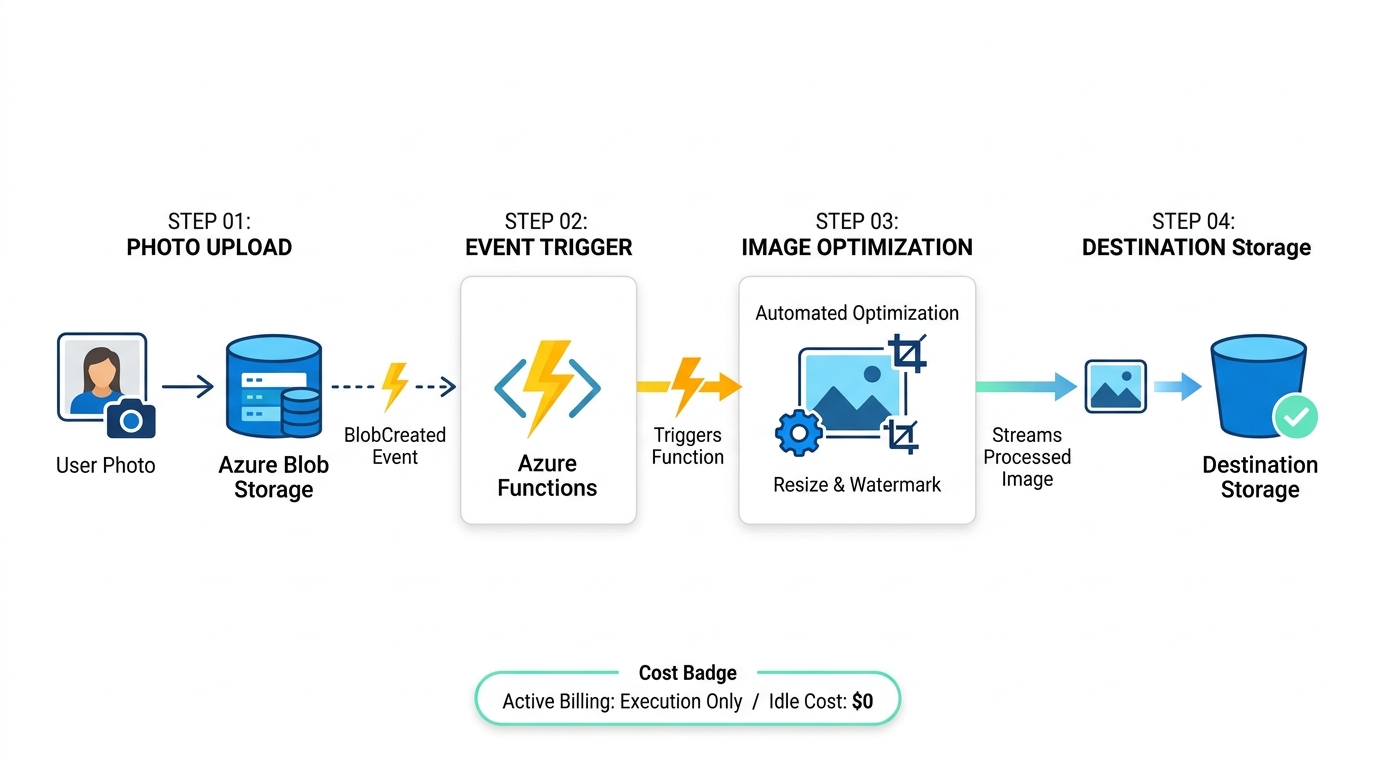 Event-driven serverless architecture: code triggers automatically upon file upload, scales instantly, and incurs zero cost during idle periods.
Pillar 5: High Availability, Resilience & Infrastructure as Code
This domain covers physical infrastructure boundaries, hardware fault domains, datacenter redundancy, and repeatable declarative deployments.
Question 17: Physical Geographic Placement of Azure Datacenters
- Question: To choose where Azure resources run physically, which of these would you select?
- Correct Answer: region
- Key Concept: An Azure Region defines a geographical area containing one or more physical datacenters interconnected via a dedicated low-latency private network.
Question 20: Repeatable Cross-Region Deployments via IaC
- Question: A training team builds lab environments in Azure using a VM, VNet, storage account, and settings—all inside one resource group. They now need to deploy the same resource group configuration to another region in a single repeatable action, without rebuilding resources manually. What is the best method to redeploy the entire configuration?
- Correct Answer: Export the resource group as an ARM template and deploy it to the new region.
- Key Concept: Embracing Infrastructure as Code (IaC) by exporting declarative JSON templates allows teams to deploy identical environments across multiple regions without manual portal configuration.
Question 30: Mitigating Entire Datacenter Facility Failures
- Question: A company needs to run a workload that must stay available even if an entire Azure datacenter goes offline. Which deployment approach should they use?
- Correct Answer: Deploy resources across availability zones.
- Key Concept: Availability Zones are physically separate datacenter facilities within a single Azure region, each equipped with independent power, cooling, and networking infrastructure.
- Deep Dive: Deploying into Availability Sets does not protect against a facility outage because an Availability Set isolates hardware across racks within the same datacenter building. If that building loses power or floods, all VMs in the Availability Set fail.
Question 34: Single-Region Datacenter Fault Tolerance Without Egress Costs
- Question: Your reservation app must remain available during a datacenter failure, keep all resources in one region, minimize latency and data transfer costs, and avoid multiregion replication. It should use Azure services that run across fault isolated locations within that region. Which deployment strategy meets these requirements?
- Correct Answer: multi-AZ deployment with zone-redundant services
- Key Concept: Utilizing zone-redundant services across multiple Availability Zones protects the application against single-datacenter loss while remaining within one region, avoiding cross-region egress bandwidth costs and latency.
Question 39: High Availability for Paired VMs via Fault and Update Domains
- Question: Your company runs a critical line-of-business application on a pair of Azure virtual machines. The VMs must maintain 99.95% availability, and you want Azure to automatically place each VM in a different fault domain and update domains to reduce downtime from hardware failures or planned maintenance. The application does not require autoscaling. You only need the two VMs to remain highly available. Which Azure feature should you use?
- Correct Answer: availability sets
- Key Concept: Availability Sets logically distribute paired VMs across distinct Fault Domains (separate physical power units and top-of-rack switches) and Update Domains (separate planned reboot schedules), delivering a 99.95% SLA.
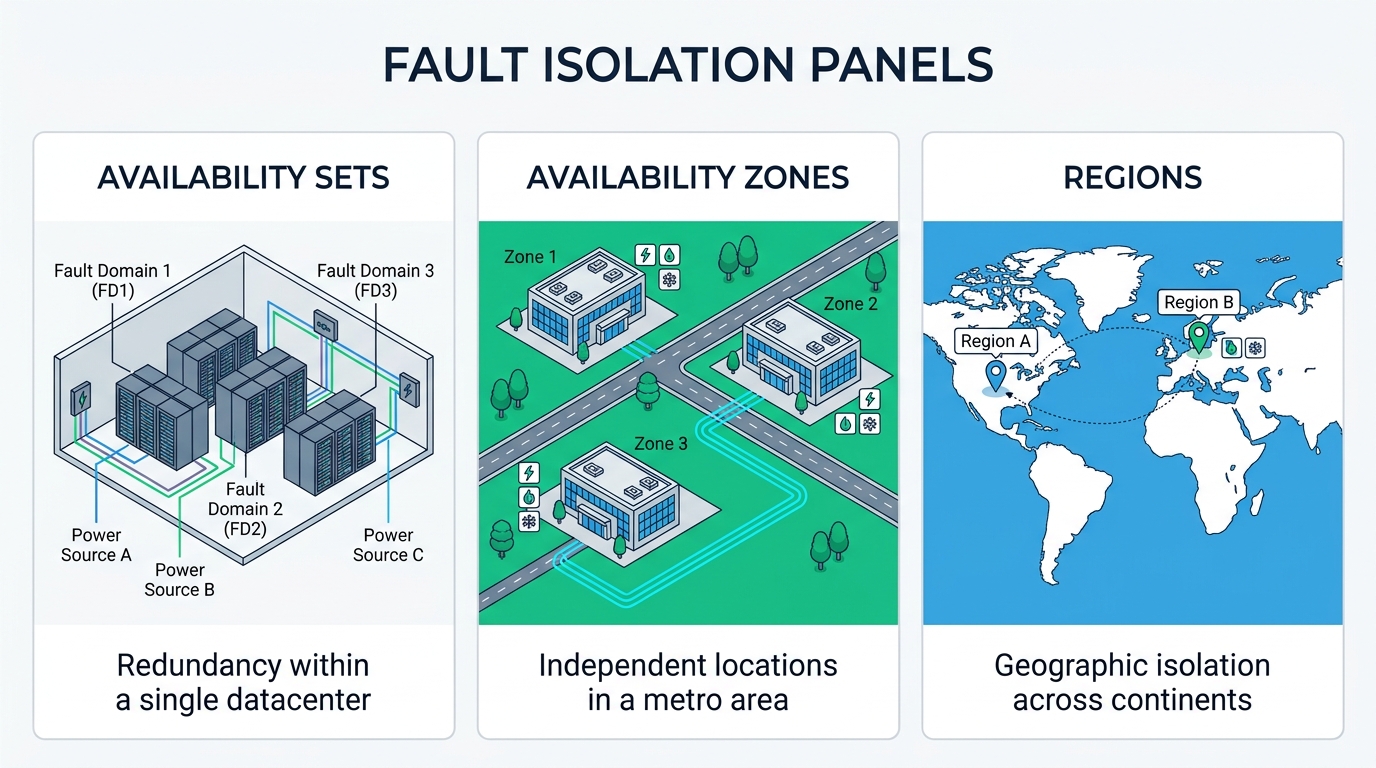 Azure resilience tiers: Availability Sets mitigate physical rack failures, while Availability Zones protect against entire datacenter facility outages.
Pillar 6: Cloud Storage Solutions & Access Tiers
This domain tests knowledge of scalable object storage for unstructured data and cost optimization using storage lifecycle tiers.
Question 36: Storing Mass Unstructured Data with HTTP Access
- Question: Your team needs a simple way to store application files, such as images and documents, in the cloud. They want a service that can store large amounts of unstructured data and provide easy access over HTTP. Which Azure service should they use?
- Correct Answer: Azure Blob Storage
- Key Concept: A massive object store designed specifically for unstructured binary data (images, PDFs, documents, backups) accessible worldwide over standard HTTP/HTTPS protocols.
- Deep Dive: Unlike Azure Files (which relies on SMB/NFS mounts for traditional file shares), Blob Storage is built for cloud-native web architectures via RESTful endpoints.
Question 37: Default Storage Tier for Frequently Accessed Data
- Question: In Azure Blob Storage, which tier is the default option and is designed for data that is accessed frequently?
- Correct Answer: Hot
- Key Concept: The default Hot access tier is optimized for active workloads that read and modify data regularly. It features higher per-gigabyte storage rates than Cool or Archive tiers, but provides the lowest per-transaction access costs.
- Deep Dive: Storing long-term archives in the Hot tier incurs excessive monthly storage fees. Conversely, placing active application data into Cool or Archive tiers triggers steep data retrieval penalties on every read operation.
Pillar 7: Operations, Monitoring & Infrastructure Automation
This domain covers cross-platform command-line administration and managed performance telemetry.
Question 27: Cross-Platform CLI Administration Without a GUI
- Question: A development team needs to manage Azure resources from Windows, macOS, and Linux. They require a management tool that works consistently across platforms, supports automation, can run interactively or in CI/CD, and does not require a graphical interface. Which Azure management option best meets these needs?
- Correct Answer: Azure CLI
- Key Concept: The cross-platform
azcommand-line utility runs identically on Windows, macOS, and Linux terminals, offering scriptability, native Bash/CI-CD pipeline integration, and headless operation. - Deep Dive: The Azure Portal requires an interactive web browser. While Azure PowerShell is also cross-platform, the Azure CLI remains the industry standard for automated shell scripting across modern Linux-based CI/CD runners.
Question 28: Managed Performance Observability and Metric Alerts
- Question: An operations team is responsible for a business-critical Azure web application. They want a fully managed monitoring solution that works consistently across Azure resources and that will: Continuously collect metrics…, Gather logs…, Automatically trigger an alert and notify the on-call engineer when CPU utilization exceeds 85% for more than 5 minutes, Require no custom infrastructure… Which Azure service should the team use?
- Correct Answer: Azure Monitor with an alert rule
- Key Concept: Azure’s centralized observability solution that collects telemetry and platform logs without requiring custom agent servers, pairing metric alert conditions with notification action groups (SMS, email, webhooks).
4 Exam Traps to Watch Out For
Reflecting on these 40 questions reveals four common traps intentionally designed to catch test takers off guard:
-
The Scope Hierarchy Trap: Questions frequently test policy enforcement across multiple environments. If a requirement states that a rule must apply to all existing and future subscriptions automatically, the answer is always Management Group, never Subscription or Resource Group.
-
The Shared Responsibility Trap: Remember the iron rule: Data classification and identity/access governance are 100% the customer’s responsibility across all models (IaaS, PaaS, and SaaS). Meanwhile, OS patching is the customer’s duty in IaaS, but shifts to Microsoft in PaaS and SaaS.
- The Resilience Boundary Trap:
- Power failure on an individual server rack → Availability Sets.
- An entire datacenter building catches fire or floods → Availability Zones.
- Catastrophic regional power grid failure or natural disaster → Multi-region / Cross-region replication.
- The Hardcoded Secrets Trap: Whenever a question asks how to connect a compute service (VM, App Service) to a backend service (Storage, SQL) without exposing credentials over the internet, never choose static connection strings or API keys. Always select Entra ID Managed Identity paired with Azure RBAC.
Frequently Asked Questions (FAQ)
1. How many questions are on the Microsoft Azure Essentials assessment?
The assessment consists of 40 multiple-choice questions covering core cloud concepts, modern compute architectures, identity governance, high availability, and operational monitoring.
2. What is the passing score for the certificate?
The passing score is typically 70% or higher (at least 28 correct answers out of 40). Once achieved, verifiable LinkedIn and Microsoft digital credentials are automatically generated.
3. How does this compare to Microsoft Certified: Azure Fundamentals (AZ-900)?
Both evaluate identical core cloud concepts and architectural principles. While the Azure Essentials Professional Certificate is hosted on LinkedIn Learning as an unproctored assessment, AZ-900 is an officially proctored Pearson VUE certification. Mastering these 40 questions provides a rock-solid foundation for clearing AZ-900.
4. Can you retake the assessment if you fail?
Yes. You can retake the assessment if your initial score falls below the required threshold. Understanding the underlying architectural principles behind each question is key to long-term success.
Conclusion
The Microsoft Azure Essentials Professional Certificate proves more than foundational vocabulary recall; it tests your ability to make sound architectural trade-offs between cost management (FinOps), system resilience (SLA & High Availability), and security governance (Least Privilege).
Whether you are validating your cloud fundamentals or preparing for deeper technical milestones such as AZ-900 or AZ-104, use these 40 real-world scenarios as a conceptual blueprint for architecting resilient cloud systems.
Comments